 lefteros
LEFTEROS / PERSONAL NOTES
Hindi has arrived in CrossInk, on every Xteink reader
10 October 2026 / Lefteris Iliadis / SomniusX

After Greek, the next question I kept getting was Hindi. With the official CrossInk a Hindi book comes out as rows of ◆, and even a font with Devanagari in it isn't enough, because Hindi letters have to be shaped: consonants join into conjuncts (क्ष, त्र, ज्ञ), a र on top becomes a reph (धर्म), and the ि sign moves in front of its letter (कि).
So I built CrossInk-Indic, and as of today it's public, with ready firmware for every Xteink model CrossInk supports: X3, X4, X4 Pro, X4 Classic and Seeed's Sticky.
- Devanagari fonts inside the firmware. Noto Sans Devanagari next to Bitter and Lexend Deca, regular and bold, at every reading size, and in the menu fonts. Nothing to copy to the SD card.
- Real shaping, using the OpenType shaper by @ssafayet from CrossPoint, ported to CrossInk. In my tests the words come out exactly as HarfBuzz (what your phone and desktop use) draws them.
- A Hindi menu, all 845 strings, proofread twice.
- Hindi titles and authors on the home screen and in the file list.
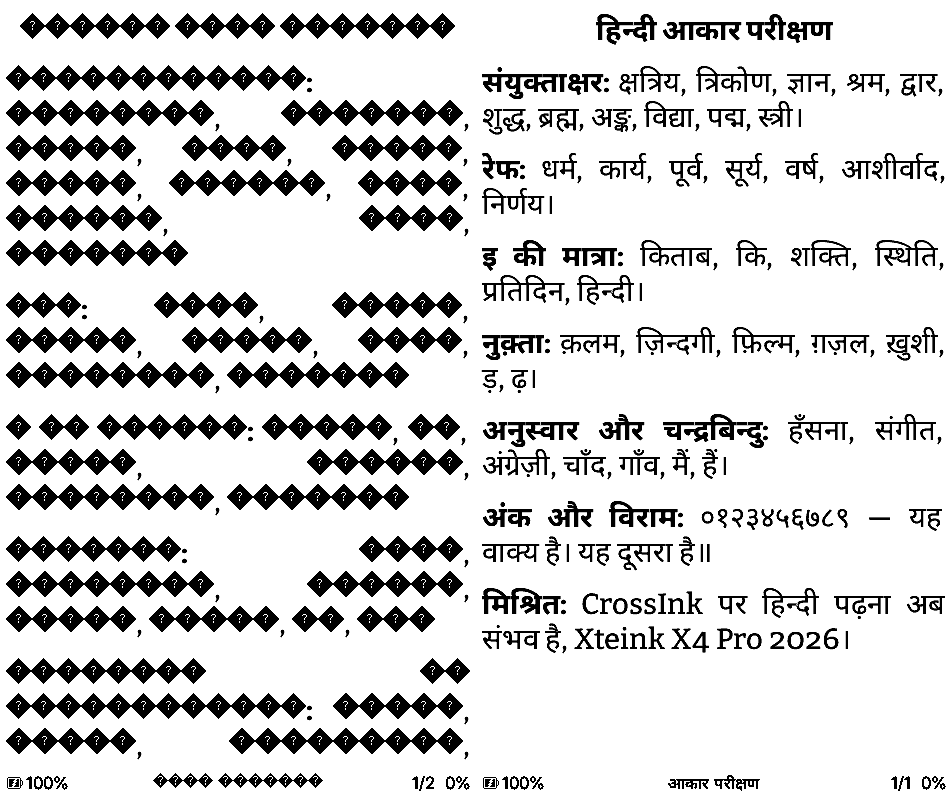
The same test page: left the official CrossInk 1.6.0, right CrossInk-Indic.
Get it
The firmware for your reader is on the CrossInk-Indic releases. Put the .bin on the SD card and pick it in Settings > System > SD Card Firmware Update. Then Settings > System > Device > Language > हिन्दी. If your reader is still on the stock Xteink firmware, install the official CrossInk first.
It's a pre-release: it has been through the simulator on every device profile, the shaping tests and an emulated X3/X4 chip, but not yet through my own hands on real hardware. If something looks wrong, a photo of the page helps a lot.
What's next: 12 more languages
The next release adds Marathi, Nepali, Bengali, Assamese, Punjabi, Gujarati, Odia, Tamil, Telugu, Kannada, Malayalam and Sinhala, each with its script built in and its own menu. They're in testing now.
The whole story, how it works inside, the sizes and the install steps are on the CrossInk-Indic page.