 lefteros
LEFTEROS / PERSONAL ARCHIVE
 Beta
BetaCrossInk-Indic
10 October 2026 / Lefteris Iliadis / SomniusX
CrossInk-Indic is CrossInk, the open firmware (MIT licence) for the small Xteink e-ink readers, with Hindi built in. Flash it and Hindi books and a Hindi menu just work, with nothing to copy to the SD card. It runs on every model CrossInk supports: X3, X4, X4 Pro, X4 Classic and Seeed's Sticky.
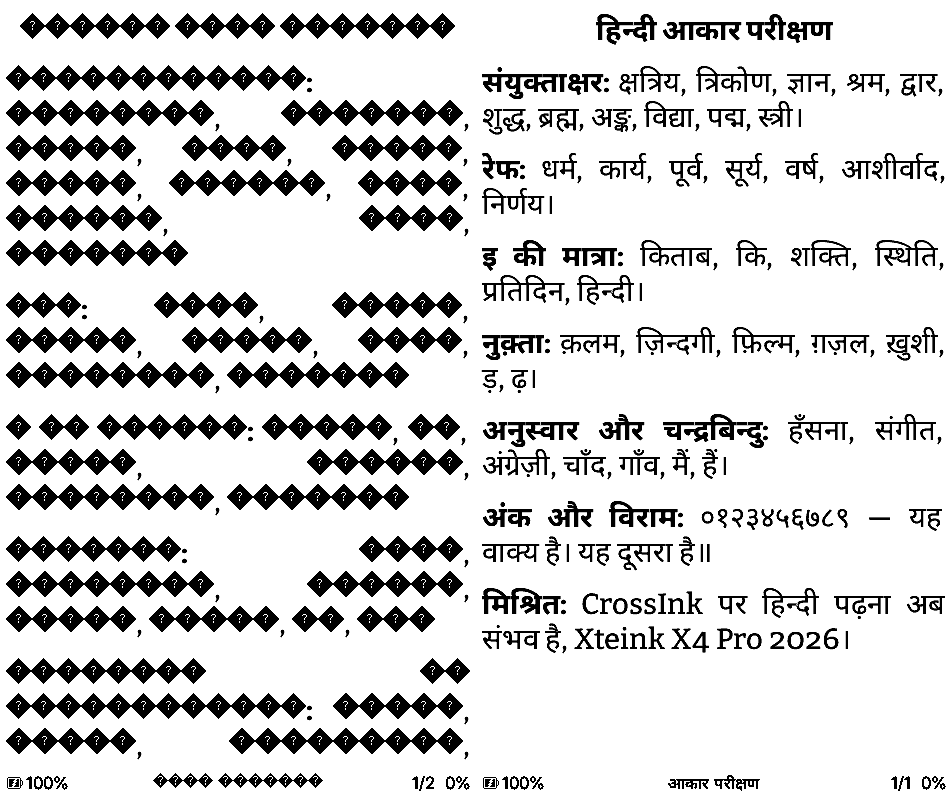
The same Hindi test page: left the official CrossInk 1.6.0, right CrossInk-Indic.
What it adds
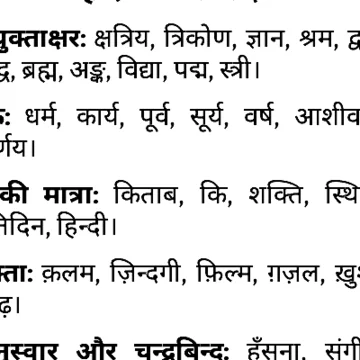
- Shaping. Hindi isn't just letters: consonants join into conjuncts (क्ष, त्र, ज्ञ), a र above the next letter becomes a reph (धर्म), the ि sign moves in front of its consonant (कि), and nukta and chandrabindu sit where the font puts them. All of it comes from the font's own OpenType tables, through the shaper @ssafayet wrote for CrossPoint (#3787), which I ported to CrossInk.
- Devanagari built in. Noto Sans Devanagari, regular and bold, at every reading size, shared by Bitter and Lexend Deca, and in the 8, 10 and 12 pt menu fonts. Its layout tables are read straight from flash, so shaping costs only a few KB of RAM, on the X3/X4 too.
- A Hindi menu. All 845 strings, under Settings > System > Device > Language > हिन्दी.
- Hindi titles everywhere. Home screen, file list, table of contents and status bar.
Screens
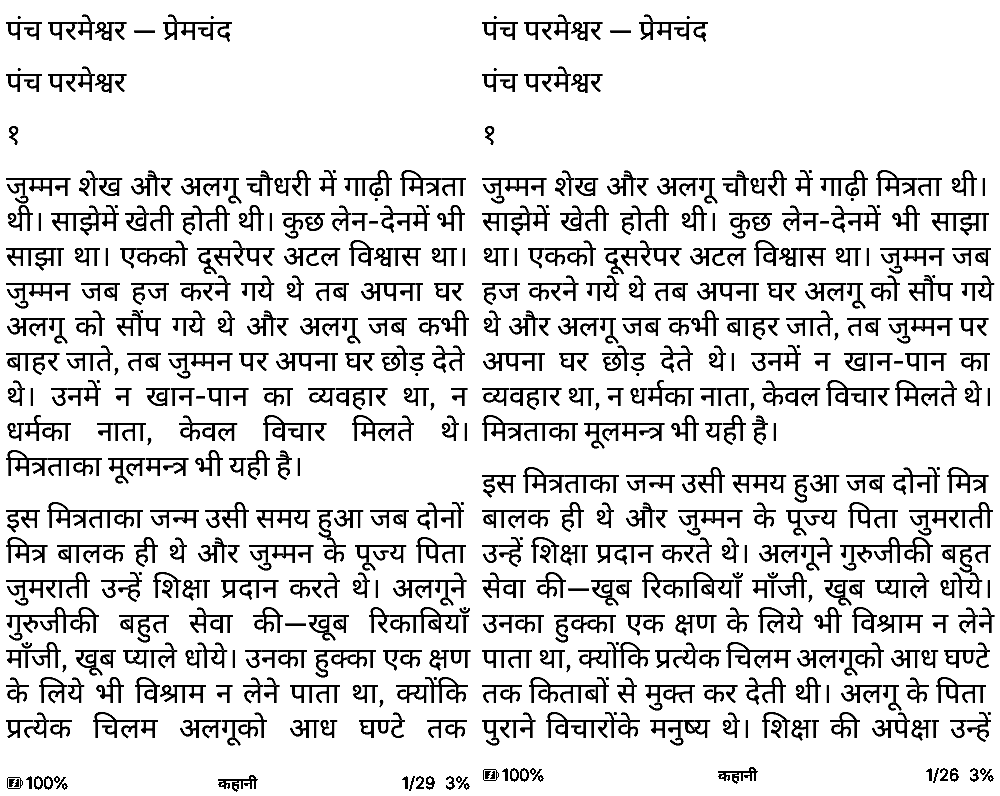
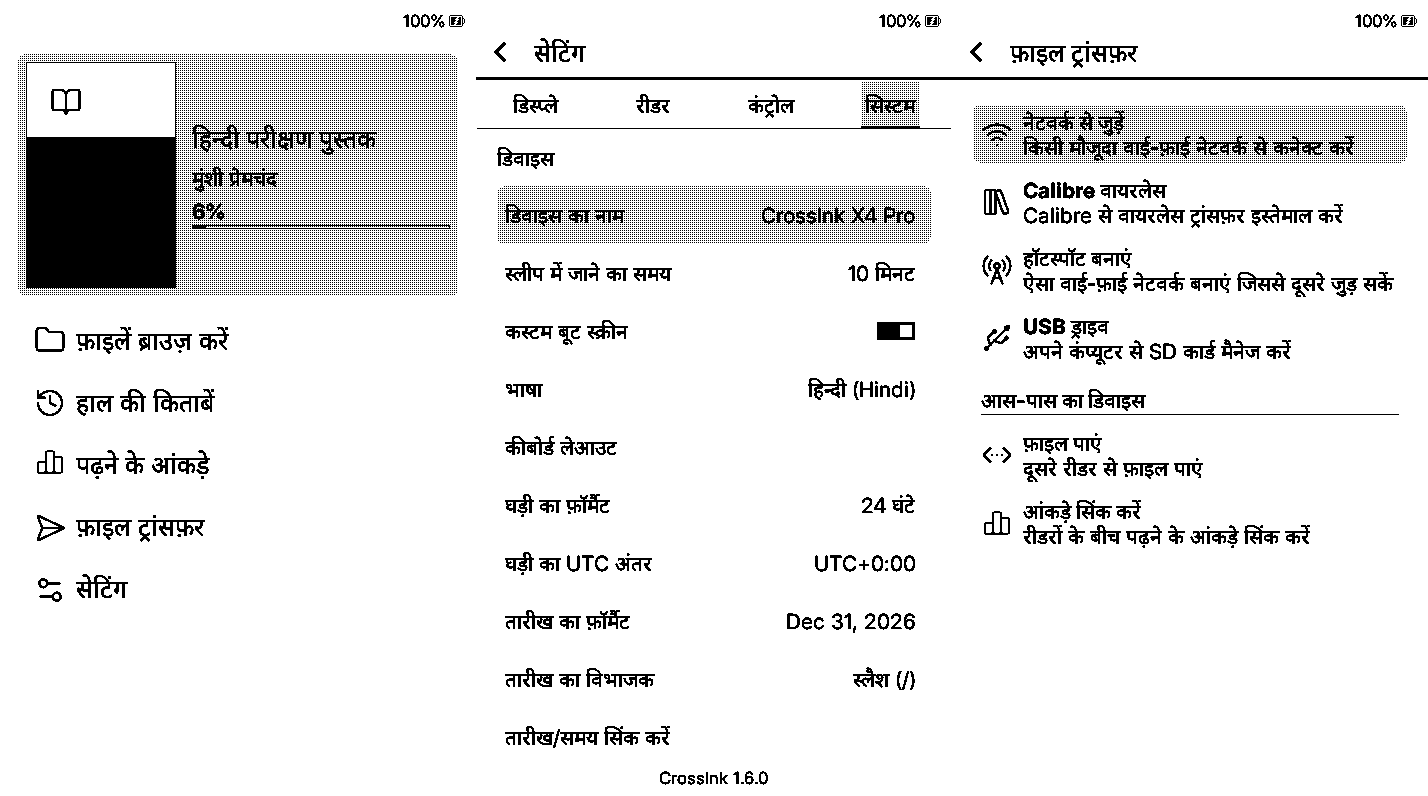
From the CrossInk simulator: Premchand's पंच परमेश्वर on the X4 Pro and X3 screens, then the home screen, settings and File Transfer in Hindi.
The stages
- After Greek, the requests for Hindi. Hindi needs more than letters: without shaping, conjuncts fall apart into letters with a visible virama (क्ष).
- 1 October 2026: v1.6.0-hindi-reading. The shaper from CrossPoint #3787 ported to CrossInk, plus two SD-card font families, "Bitter Hindi" and "Lexend Hindi", with matching Latin. English menus.
- 1 October: v1.6.0-hindi. The Hindi menu, read with the SD-card fonts.
- 1 October: v1.6.0-indic.1. Its own repository, with Devanagari compiled into the firmware: no SD-card fonts needed, menus that stay Hindi everywhere, and the other 27 menu languages taken out to make room.
- 2 October: v1.6.0-hindi.2. The Hindi wording proofread twice: two blind back-translations (made without seeing the English) and a check against Android's and KOReader's Hindi.
- 10 October: public. The repository and all four releases are open to everyone.
- Next: v1.6.0-indic.2. Twelve more languages, each with its own script built in. In testing now.
Install
Download the file for your reader from the v1.6.0-indic.1 release and put it anywhere on the SD card:
Reader File Xteink X3 / X4 firmware-x3-x4-v1.6.0-indic.1.binXteink X4 Pro firmware-x4-pro-v1.6.0-indic.1.binXteink X4 Classic firmware-x4-classic-v1.6.0-indic.1.binSeeed Sticky firmware-sticky-v1.6.0-indic.1.binSettings > System > SD Card Firmware Update, and pick the file.
Settings > System > Device > Language > हिन्दी.
Before writing anything, the updater checks the chip, the board tag, the checksum and the SHA-256, and writes to the spare slot, so a file for another model is refused, not flashed. If the reader is still on the stock Xteink firmware, install the official CrossInk first from the flash tools. To go back, flash the official CrossInk the same way. Books you had already opened are laid out again once.
How it works
Shaping on a small chip
The X3 and X4 have an ESP32-C3: 400 KB of RAM and no PSRAM. Noto Sans Devanagari has 845 glyphs, 564 of them with no character of their own (conjuncts, half forms, reph, vowel-sign variants), reached through 13 substitution and 4 positioning features. The shaper reads the font's OpenType tables, so the font decides how every syllable looks, the same way HarfBuzz does on a phone. Each word is shaped once, when a chapter is laid out, and stored with the page, so turning pages never shapes again.
The tables live in a layout font compiled into the firmware and read in place from flash, so they take no RAM.
Testing
- Against HarfBuzz. Host tests compare the built-in fonts with HarfBuzz glyph for glyph.
- On an emulated X3/X4. Espressif's QEMU runs the real shaping code on an ESP32-C3 with CrossInk's partition table and no PSRAM. The words match HarfBuzz there too, every glyph bitmap loads, and free RAM stays above 266 KB.
- In the simulator, on every device profile: Hindi books in both fonts at 10–16 pt, bold and italic, every settings tab, the reader menu, the file list, home and File Transfer. English pages come out pixel for pixel the same as the official firmware.
Not yet on my own real hardware, so the releases are marked pre-release.
Size
| Reader | Official 1.6.0 | CrossInk-Indic |
|---|---|---|
| X3/X4 | 6,105,600 | 6,264,848 |
| X4 Pro | 6,072,544 | 6,224,144 |
| X4 Classic | 5,906,384 | 6,056,720 |
| Sticky | 5,981,856 | 6,131,472 |
In bytes. The app partition is 6,553,600 bytes. The fonts, the shaper and the Hindi strings fit because the other 27 menu languages are left out; English and Hindi stay.
SD-card fonts still work
If you'd rather read Hindi in a serif, "Bitter Hindi" (Bitter with Noto Serif Devanagari) and "Lexend Hindi" are attached to the release as zips for the /.fonts folder. Any .cpfont built with shaping data works too.
Status
A pre-release, free and open. The Hindi menu was translated with machine help and checked carefully, but a native speaker's corrections are very welcome. For now, updates are by SD card: download the next release's file and flash it the same way.
Sources
- CrossInk-Indic on GitHub
- The releases
- CrossInk by @uxjulia
- CrossPoint Reader and the shaper in #3787 by @ssafayet
- Noto fonts under the SIL Open Font License
Your language next?
Twelve more Indic languages are in testing for the next release. If your language is missing from CrossInk altogether, I take commissions: details on the language commissions page.