 lefteros
LEFTEROS / PERSONAL ARCHIVE

dwm-titus — my patches and skills for Chris Titus's desktop
13 October 2026 / Lefteris Iliadis / SomniusX
dwm-titus is Chris Titus's desktop for Fedora: dwm, the tiling window manager, with a whole desktop around it. A panel and Control Center in Quickshell, Settings, themes, a guided installer and its own Fedora image. It's fast, keyboard first, and runs on X11. Its documentation is the place to start.
I use it in a Fedora 44 virtual machine, and since October I've been sending it fixes and features through its issues and pull requests. This page keeps track of them: what each one does and where it stands. The stories behind them are in the posts.
Where things stand
| What | Pull request | State |
|---|---|---|
| kitty follows the active theme instead of Nord | #377 | merged, 10 October |
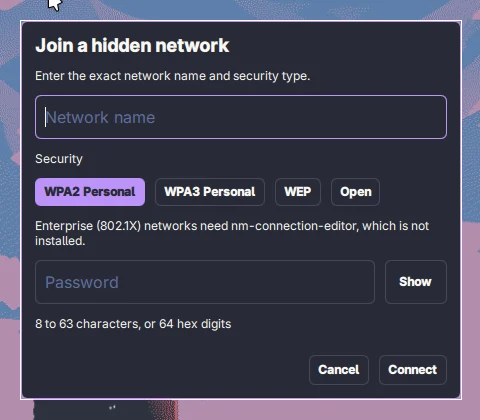
| Join a hidden Wi-Fi network from the panel | #379 | open |
| Docs: what survives an update | #380 | open |
| Optional seconds in the panel clock | #381 | open |
| dwm publishes the keyboard layout and switches on request | #383 | open |
| A keyboard layout pill in the panel | #384 | open |
| Settings > Input: no more power button “keyboard”, one card per device | #385 | open |
| Two skills for terminal assistants, in titus-ai | titus-ai #4 | open |
| Proposal: Diagnose with AI for crashes and hung windows | issue #378 | proposal |
Last checked on 13 October 2026. Open means it's waiting for review; Chris decides what goes in, and anything open can still change or be turned down.
What each one does
kitty and the theme. kitty loaded the theme and then two sets of its own colours on top, so it stayed on Nord whatever you picked. Now the theme loads once, last, and existing installs are cleaned up once, with a backup. The post.
Hidden Wi-Fi. A Hidden network… row in the panel's Wi-Fi list opens a form for the name, the security type and the password. Enterprise (802.1X) networks open nm-connection-editor, now installed with the desktop. A wrong password fails in about 4 seconds instead of 90.
What survives an update. The docs now say plainly that ~/.config/quickshell/ is replaced by every update, and what is kept:
| Kept (yours) | Replaced (managed) |
|---|---|
~/.config/dwm-titus/, the TOML files and other settings |
~/.config/quickshell/ |
Other application settings under ~/.config/ |
~/.local/share/dwm-titus/config and scripts |
.xinitrc and config.h |
The installed dwm-* commands |
Seconds in the clock. A switch in Settings > Appearance and in the Control Center's Bar Widgets, off by default, kept in panel-widgets.conf so it survives updates.
Keyboard layouts. My Keyboard Layout plugin for Omarchy, rewritten for X11. dwm publishes the active layout and switches when asked, and there's a cyclelayout function for a key binding. The panel shows a pill (US, GR, DE…): click or scroll to switch, middle-click for the first layout, right-click for Settings > Input. Settings > Input gets Switch layout with (Alt+Shift, Ctrl+Shift, Caps Lock and more) and Layout LED buttons. Keep a Latin layout first: with gr,us, a SUPER+k shortcut stopped working in my tests.
Settings > Input. Devices that aren't real keyboards, like the power button, no longer get layout fields, and a device that shows up as several parts gets one card.
Skills in titus-ai. titus-ai is Chris's collection of rules and skills for terminal assistants. When someone asks an assistant to change or fix their desktop, it should work on the real files and stay out of the folders that updates replace. dwm-titus covers changes (shortcuts, themes, window rules, panel widgets, autostart, the login screen), and dwm-titus-debug diagnoses problems without touching anything unless asked. Both were written from dwm-titus's own source and a real 0.7.2 install. The why, in a post.
Diagnose with AI (proposal). On a branch of my fork: notifications with buttons, a check for windows that stop responding, “Diagnose with AI” on crashes and hung windows, and a Settings page to pick a terminal assistant. It's a proposal for Chris to accept, change or decline.

Try a pull request before it's merged
Every open pull request lives on a branch of my fork: hidden-wifi, docs-managed-quickshell, clock-seconds, keyboard-layout-dwm, keyboard-layout-panel and settings-input-devices. On a test machine, not your daily one:
git clone https://github.com/Somnius/dwm-titus.git
cd dwm-titus
git checkout keyboard-layout-panel
./install.sh --profile recommended
Going back is the same with Chris's repository and main. Remember the table above: every install or update replaces ~/.config/quickshell/.
Posts
- Kitty now follows the theme in Chris Titus's dwm, 11 October 2026
- Hidden Wi-Fi, keyboard layouts and a clock with seconds for Chris Titus's dwm, 13 October 2026
- Skills for dwm-titus: sending assistants to the right files, 13 October 2026
Thanks
To Chris Titus for dwm-titus and for merging the first one, and to everyone whose issue or testing started something here: Menk1l, Abs313a, abdrezzakboumediene, gkap28 and rahuljangirworks.