 lefteros
LEFTEROS / PERSONAL ARCHIVE
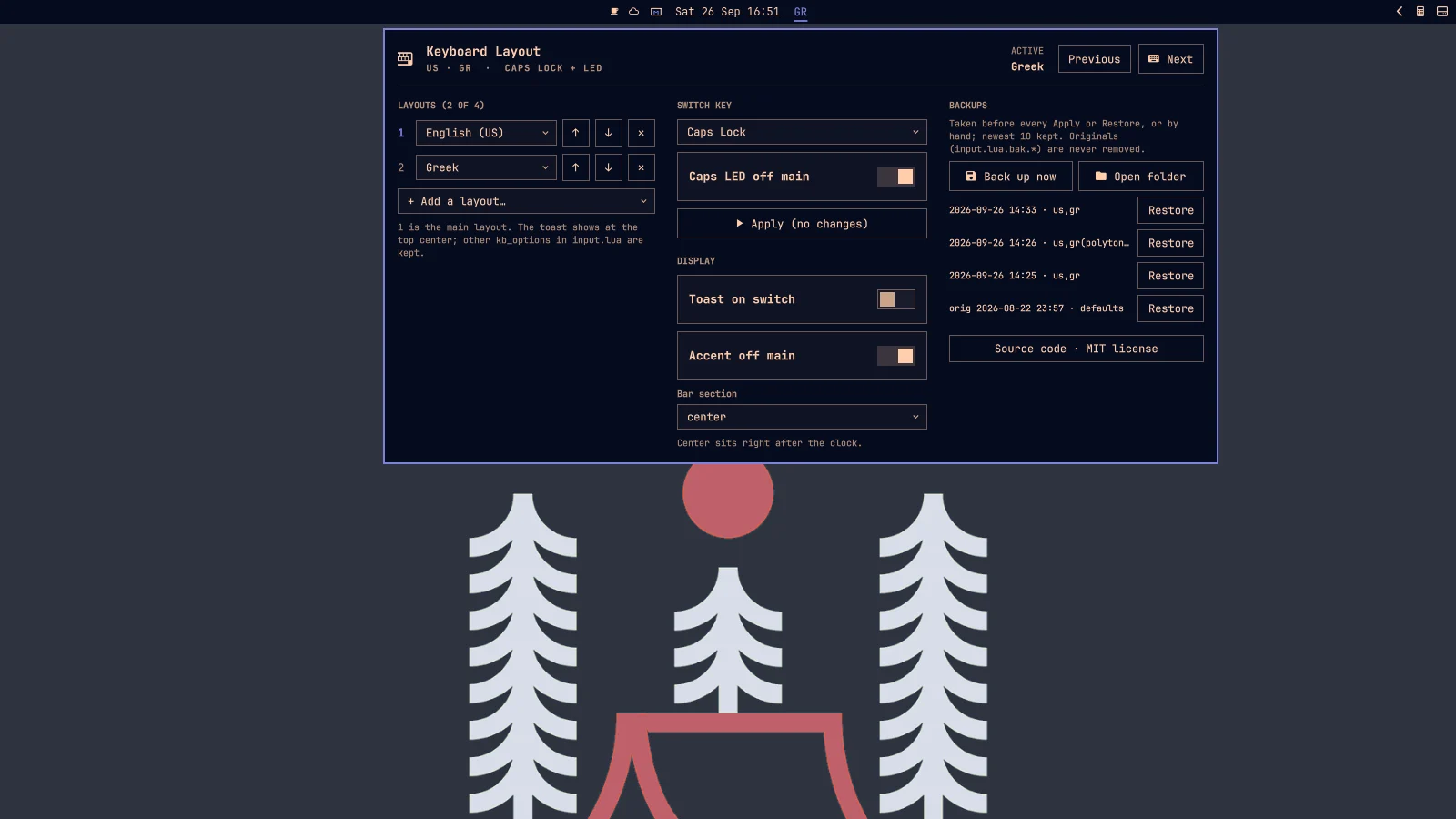
Keyboard Layout for Omarchy
23 August 2026 / Lefteris Iliadis / SomniusX
Keyboard Layout shows the active keyboard layout in the Omarchy bar — EN, GR, DE, PT or any other — and switches it whenever you want. It also manages the layout part of ~/.config/hypr/input.lua, for any language and up to four layouts at once. Current version: 1.2.6.
On the bar
- Left-click: opens the settings panel.
- Right-click: next layout.
- Scroll: next or previous layout.
- Middle-click: back to the main layout (layout 1).
- Hover: the full layout name, e.g.
Greek (polytonic).
The panel is laid out in columns — Layouts, Switch key + Display and Backups — so it fits small screens too.
What is new in 1.2.6 (15 October 2026)
- The layout search never touches the clipboard. Both layout pickers used Omarchy’s searchable dropdown, whose search box is an ordinary text field. On Qt, every such field hooks the clipboard as soon as it exists, even hidden, and can pull in text another app offers, with no size or time limit. 1.2.6 has its own copy of the dropdown where the search box only reads the keys you type: printable text, up to 64 characters, and Backspace. Paste and Shift+Insert do nothing, and there’s no text field left for a middle-click to paste into. Thanks to HANCORE-linux, who caught it in the marketplace review.
- Ready for Omarchy’s split bar. Omarchy’s next release splits the middle of the bar in three, with the clock in a box of its own. Centre now puts the widget right after the clock there too, not inside the clock’s box. The panel also follows where the widget really is after you drag it by hand, instead of saying “Already on the …” and skipping a real move.
Tested on Omarchy 4.0.4 with Qt 6.11.2. The split bar is covered by the tests only, until that Omarchy release is out. On the marketplace, 1.2.5 and 1.2.6 go in together; the update was waiting for review on 16 October.
What is new in 1.2.5 (13 October 2026)
Ready for Omarchy’s next release, where Caps Lock is Caps Lock again and Shift+Caps Lock is Compose (more in the post):
- With a switch key on Caps Lock, Omarchy’s new
omarchy:shift_caps_composeno longer stays behind and silences it. Compose moves to Right Ctrl, with a note before Apply. - Compose now prefers Right Ctrl, then Menu, then Right Alt, and skips a key another option already uses. On Greek, German and similar layouts Right Alt is AltGr, so Compose there only worked on layout 1.
- Other options that take over Caps Lock (
lv3:caps_switch,lv5:caps_switch) step aside along withcaps:*.
What is new in 1.2 (26 September 2026)
1.2.0 brought the big changes, and two fix releases followed the same day:
- 1.2.1: the “Source code” button now opens the repository reliably (through
xdg-open, like “Open folder”), the README was rewritten user-first, and the marketplace image is a real capture of the bar with the panel. - 1.2.2 — for stock Omarchy installs:
- Keeps Omarchy’s default
kb_options(compose:caps,shift:both_capslock_cancel,grp:alts_toggle) on the first Apply instead of replacing them. - When the switch key clashes with another setting, a note appears before Apply: Compose moves off Caps Lock (to Right Ctrl since 1.2.5), and
caps:*remaps give way. - No longer mistakes hotkey and media pseudo-keyboards (e.g. on ThinkPads) for real ones.
- If layout 1 is not a Latin layout, it warns that Omarchy’s SUPER shortcuts stop working.
- Refuses to write if
input.luachanged in the meantime.
- Keeps Omarchy’s default
Thanks to tlxq for issue #1 and betterthinker for PR #3.
What 1.2 brought:
- Up to four layouts, with variants. Chosen from xkb’s own table of more than 750 layout and variant pairs (e.g.
gr(polytonic),de(nodeadkeys)). Every picker is searchable, and rows can be reordered or removed. Layout 1 is the main one. - Synced switching across every keyboard. Receivers, laptop keyboards and macro pads show up in Hyprland as separate keyboards. The plugin switches them all together in one
hyprctl --batchcall, so they never drift apart. Virtual “keyboards” (fcitx5, the power button, the lid switch) are left alone. - Password warning. If the main layout is not English (US), the panel says so and Apply asks you to confirm: screens such as hyprlock start on the main layout, and a password you usually type in English may be rejected.
- More switch keys. Caps Lock, Alt+Shift, Ctrl+Shift, both Shifts, Right Alt, Scroll Lock and more — or None, to switch only from the bar or a Hyprland keybinding. Super and Space combinations are never offered, because Omarchy uses them.
- Precise input.lua edits. Lua comments and strings are understood, so a commented example such as
-- kb_variant = "intl"is never mistaken for a real setting. Only the live values change; your otherkb_options(e.g.compose:ralt) stay as they are, and an Apply that changes nothing writes nothing. - Backups and restore.
input.luais copied before every Apply or Restore, Back up now does it whenever you like, and the newest 10 are kept. Restore from the panel or over IPC, and Open folder to see the files. - Optional: a small toast at the top centre of the screen on every layout change, and the bar label in your theme’s accent colour while you are off the main layout.
- Placement without a restart. Centre (next to the clock) or right; it applies instantly, without reloading the shell or Hyprland.
- Bounded, validated input.
input.lua, the settings, and thehyprctlandxkbclidata are read with size limits and checked; anything malformed is rejected and never replaces the last good state.
What it changes on your system
~/.config/hypr/input.lua— only when you press Apply or Restore:kb_layout,kb_variantand the layout-switch part ofkb_options. Everything else in the file stays as it is.~/.config/omarchy/keyboard-layout/config.json— when you change a panel setting: placement, toast and accent label.~/.config/omarchy/keyboard-layout/backups/— before every Apply or Restore, or on Back up now: copies ofinput.lua, the newest 10.
Nothing else: no system files, and no root access is needed. If input.lua sets no options of its own, Omarchy’s defaults are kept, except the ones that would block a Caps Lock switch key.
Install and update
omarchy plugin add https://github.com/Somnius/Keyboard-Layout-for-Omarchy.git --enable
Already installed? omarchy plugin update lef.keyboard-layout. Settings from 1.1.x are read as they are, and old input.lua.bak.* copies stay listed and restorable.
From the command line
omarchy-shell lef.keyboard-layout next        # next layout, on every keyboard
omarchy-shell lef.keyboard-layout set gr      # a specific layout
omarchy-shell lef.keyboard-layout backup      # back up input.lua now
omarchy-shell lef.keyboard-layout backups     # JSON list of backups
It pairs nicely with the None switch key and a Hyprland keybinding of your own. Every command is in IPC.md.
On dwm-titus too
The same idea, rewritten for X11, is proposed for Chris Titus's dwm-titus: dwm publishes the active layout and a panel pill switches it, with the same click, scroll and 150 ms scroll throttle. It's in two open pull requests, #383 and #384. More on the dwm-titus page.
Documentation
- README — usage, install, upgrading from 1.1.x
- CONFIGURATION.md — every setting and file
- BACKUPS.md — how backups and restore work
- ARCHITECTURE.md — data flow and safety measures
Sources and date
First release and marketplace listing: 2026-08-23. Versions 1.2.0, 1.2.1 and 1.2.2: 2026-09-26. Versions 1.2.3 and 1.2.4 (hover tooltip on Omarchy 4.0.4, ready for Qt 6.12): 2026-10-09. Version 1.2.5 (ready for Omarchy’s new Caps Lock): 2026-10-13. Version 1.2.6 (a search that never touches the clipboard, ready for the split bar): 2026-10-15.
All dependencies ship with Omarchy (hyprctl, xkbcli, Perl). License: MIT.