 lefteros
LEFTEROS / PERSONAL NOTES
Omarchy Mobile after the Call to Arms: seven more phones, why charging stopped at 92 %, and where I need help
21 November 2026 / Lefteris Iliadis / SomniusX
On 17 November I opened a Call to Arms on Omarchy Mobile, Derek Ross's project: booting Omarchy on a phone isn't enough, phones have to stay cool, last the day and be ready when you pick them up. This is what happened in the four days since, on the issue (#867) and on my Pixel 8 Pro.
A note on status before anything else. Every item below says whether it's merged, in review (an open pull request) or only on my phone. The last ones aren't in any release.
Seven more phones
The thread now counts seven phones next to my 8 Pro, each from its owner:
- Motorola razr ultra 2025 (leap, SM8750), from lutzlstein
- OnePlus 13 (dodge, SM8750), from mrlund, baseline in #869
- Pixel 8a (akita), now developed by aninmucek, who took it over from VirtualMachinist
- Pixel 9 Pro Fold (comet), from kdegeek
- a second Pixel 8 Pro (husky), from gitColinX, baseline in #878
- Pixel 10a (stallion), from replghost, in bring-up on #668
- OnePlus 8 Pro (instantnoodlep, SM8250), from inumineq, device request #808
Two findings from them matter for everyone:
- Qualcomm phones: lutzlstein found on leap that the SoC never sleeps: the
qcom_statscounters for ddr, cxsd and aosd stay at 0, because the interconnect drivers wait on a crypto node that has no driver, so every bandwidth vote stays at maximum. mrlund saw the same on dodge, and inumineq on the OnePlus 8 Pro, so it isn't specific to one chip. - Tensor phones (8 Pro, 8a, 9 Pro Fold): the same gaps on all of them: no cpuidle driver, an empty
pm_genpd, the GPU as the only devfreq device, andclk_ignore_unused pd_ignore_unusedon the command line. On the 9 Pro Fold, kdegeek reports s2idle in daily use since 10 November, and a Wi-Fi wake fix for brcmfmac that probably applies to every Tensor Pixel with a Broadcom chip.
Charging: why it stopped at 92 %
On my phone charging stopped at 92 %. The cause: the bootloader sets a fixed 4.35 V float voltage, and without the charger driver Linux never changes it. Google's own charging stack uses several steps, up to 4.48 V, depending on the battery's temperature.
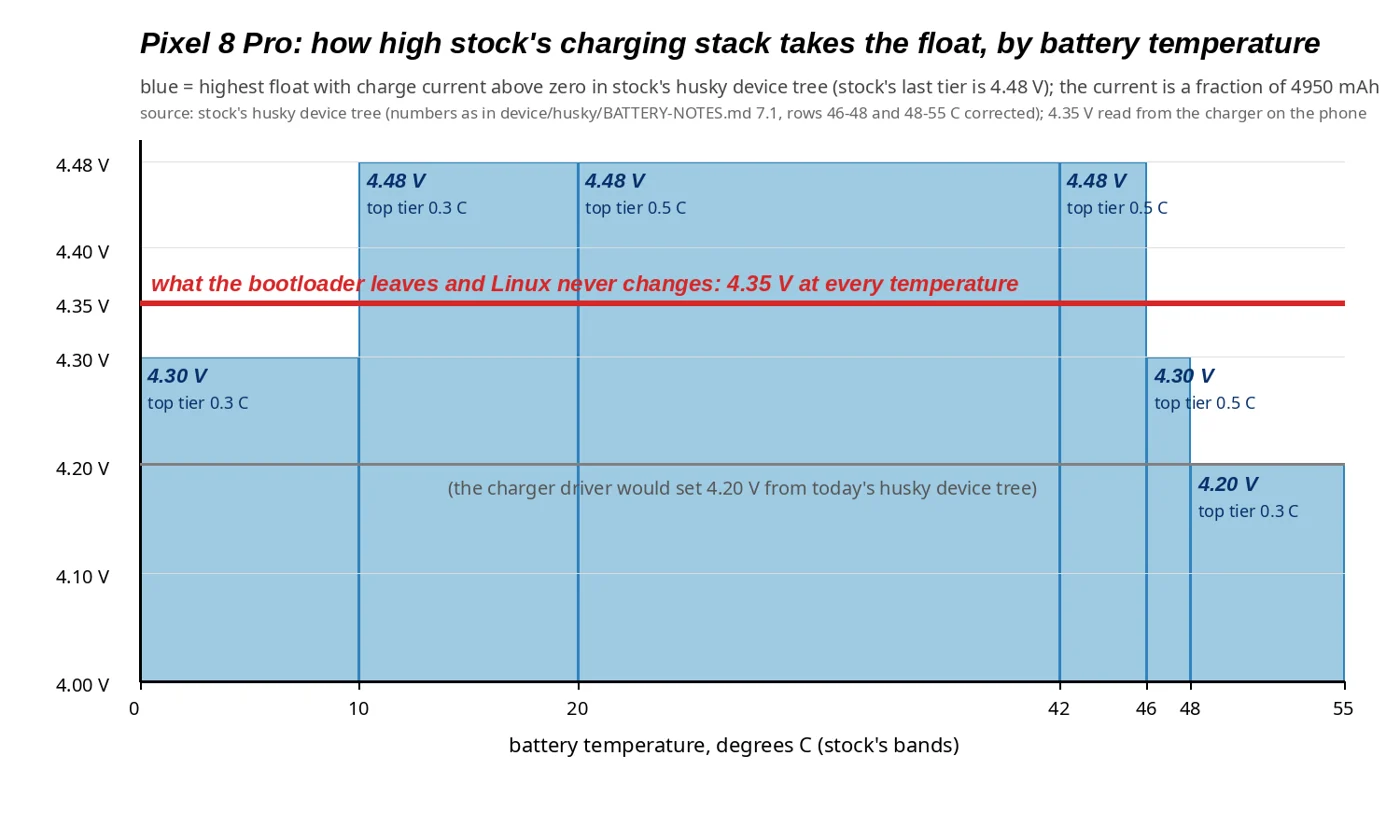
On 16 November, on a test kernel with a 4.45 V float and a guard script watching, an attended run went from 90 % to 100 %. That's only my phone, and the raised float stays off until Derek reviews the limits on #761. His words: "that review is mine to do". The daily kernel with the charger driver loaded writes 4.20 V and stops at about 82 %.
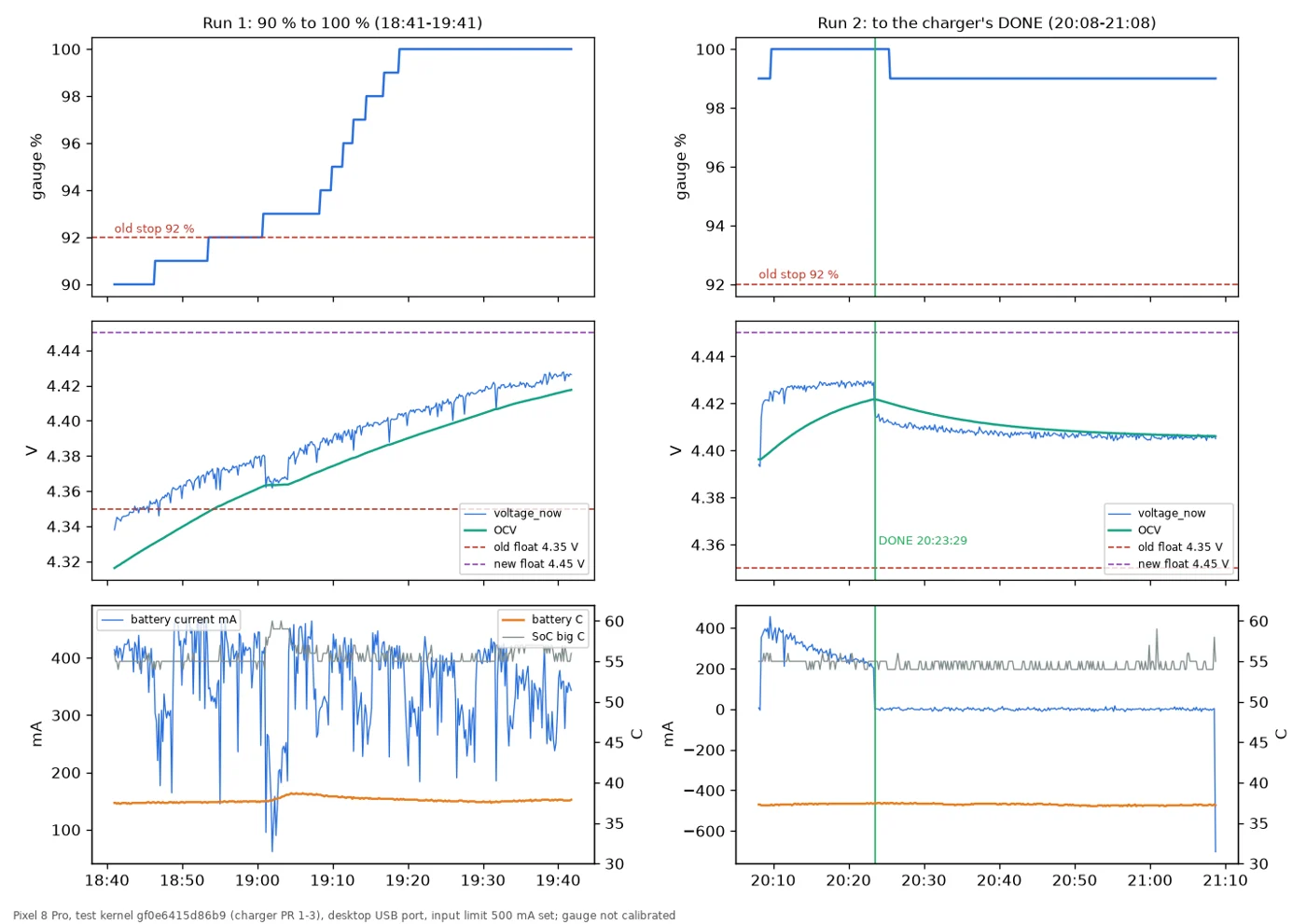
The kernel side is in review: #265 (a guard table per board), #266 (charge thresholds, read-back, safer limits), #267 (the DONE check) and #277 (a charge defender, still a draft).
Merged: a Battery page in Settings with a charge limit from 80 to 100 % (#860, 18 November). On my phone, the night of 16 to 17 November before the merge, with the limit at 90 % it charged to 90 %, stopped, and sat at 89 to 90 % for the rest of the night on the cable.
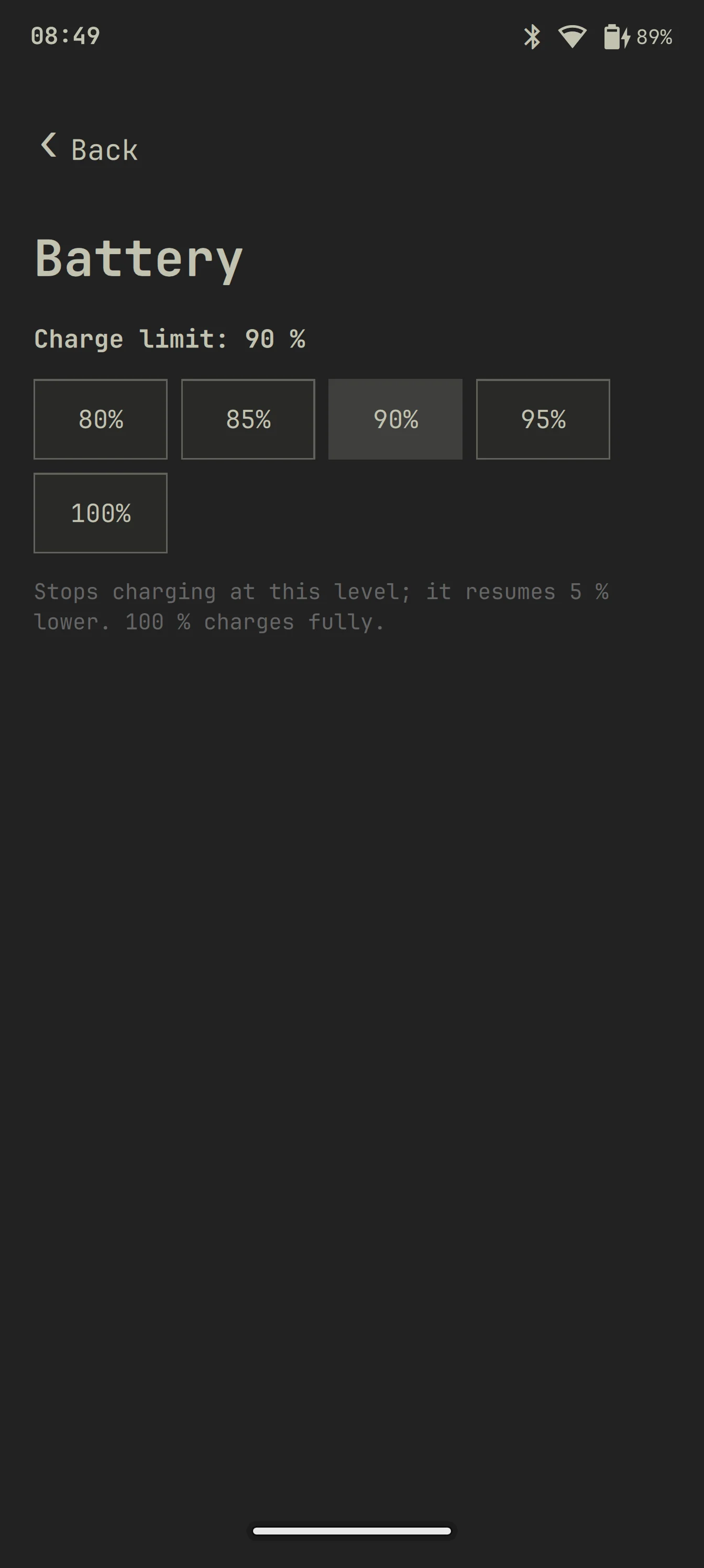
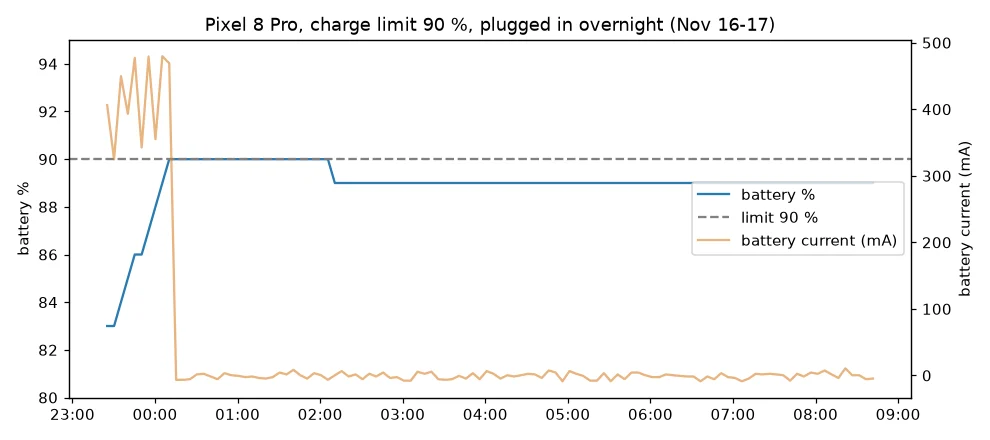
The Battery page, and the night of 16 to 17 November at a 90 % limit.
Heat: a thermal guard
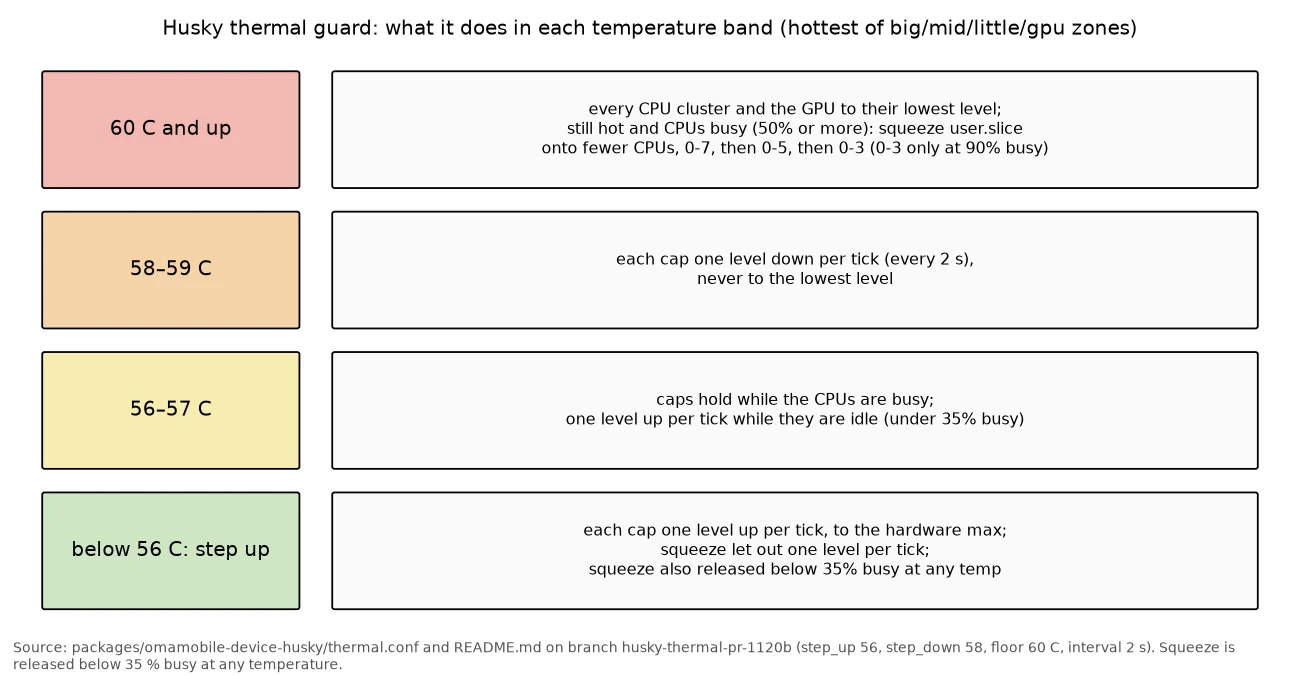
The phone runs warm even at idle. Until the kernel gets deeper CPU idle, I wrote a guard for the device package: it steps the CPU and GPU clocks down from 58 °C and drops them to the lowest step at 60 °C. It's in review as #946, and so far tried only on my phone, with synthetic load and one overnight idle log.
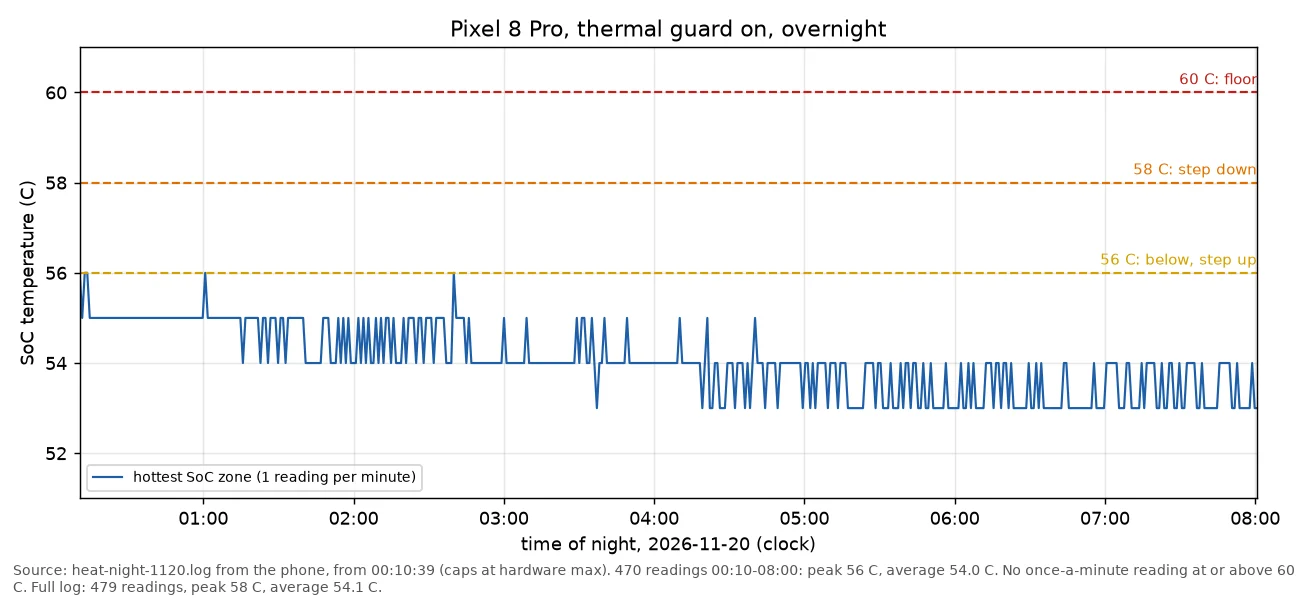
On the night of 19 to 20 November the log has 479 readings, one per minute, with a peak of 58 °C and an average of 54.1 °C. The log reads once a minute while the guard checks every 2 seconds, so it can't prove the SoC never touched 60 °C.
Why it's warm, from what I measured: with the screen off and the cable out the phone draws about 540 mA. Stopping the recorder, taking CPU cores offline, capping the clocks, and turning off Bluetooth and NFC didn't move that. Wi-Fi power save saves about 30 mA and is now on by default (#836, merged). With the screen off the shell still wakes about 130 times a second (measured on the charger), the memory bus (MIF) sits at 2028 MHz with no devfreq driver, and deeper CPU idle (C2) made my phone reboot-loop, so it's off.
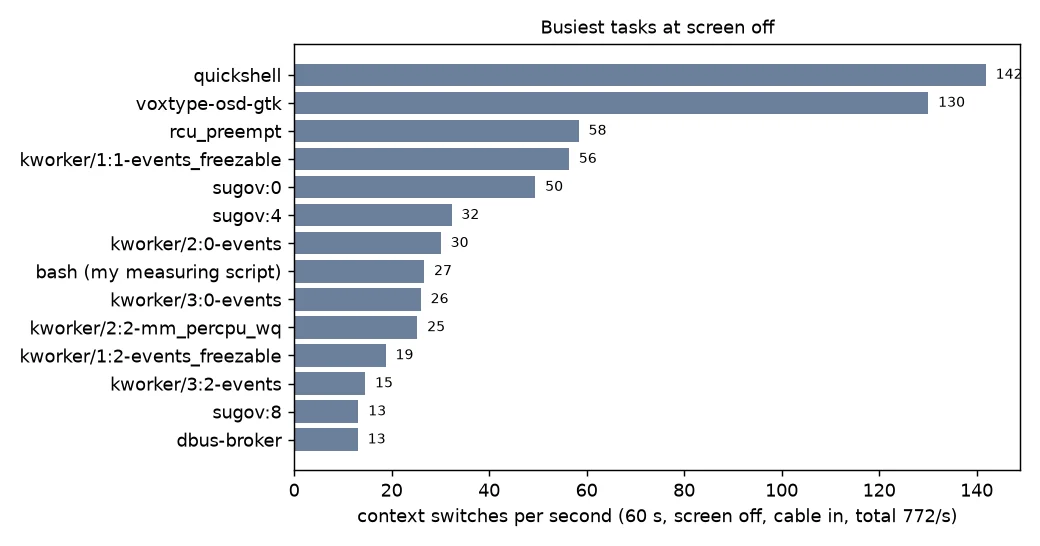
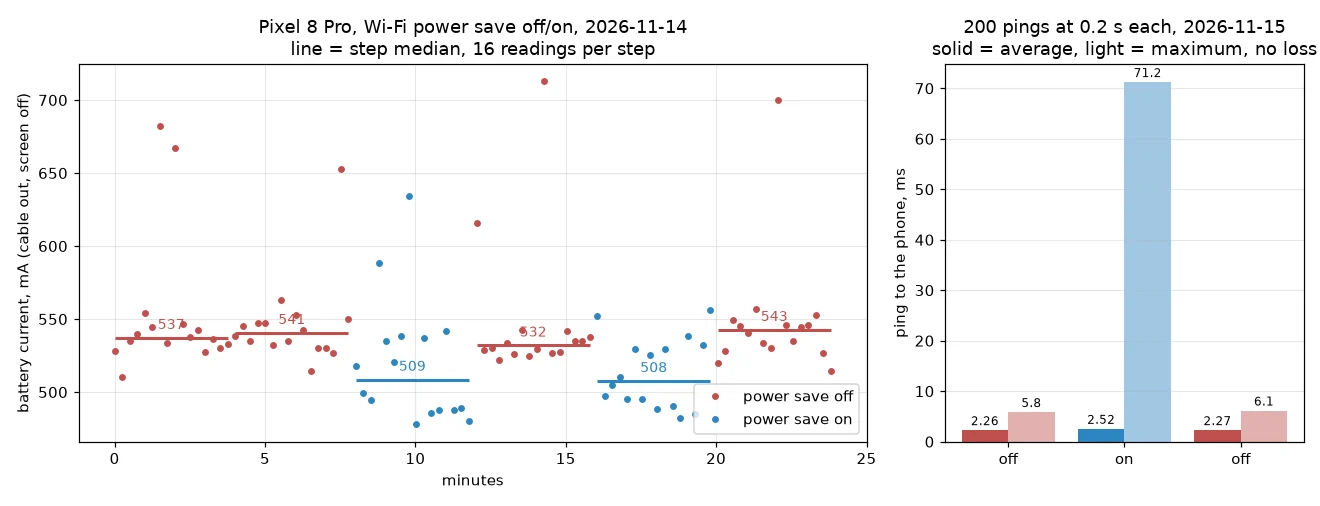
Left: the busiest tasks with the screen off, in context switches per second, cable in. Right: Wi-Fi power save, about 30 mA.
Keyboard and layouts
squeekboard, the on-screen keyboard, barely moves upstream, so the layouts live in Omarchy Mobile. In review: a Greek terminal layout (#951), a Keyboard page in Settings with layouts and a switch key (#892), and two drafts, Austrian and Kazakh layouts generated from xkb (#952) and the current layout in the bar (#949).
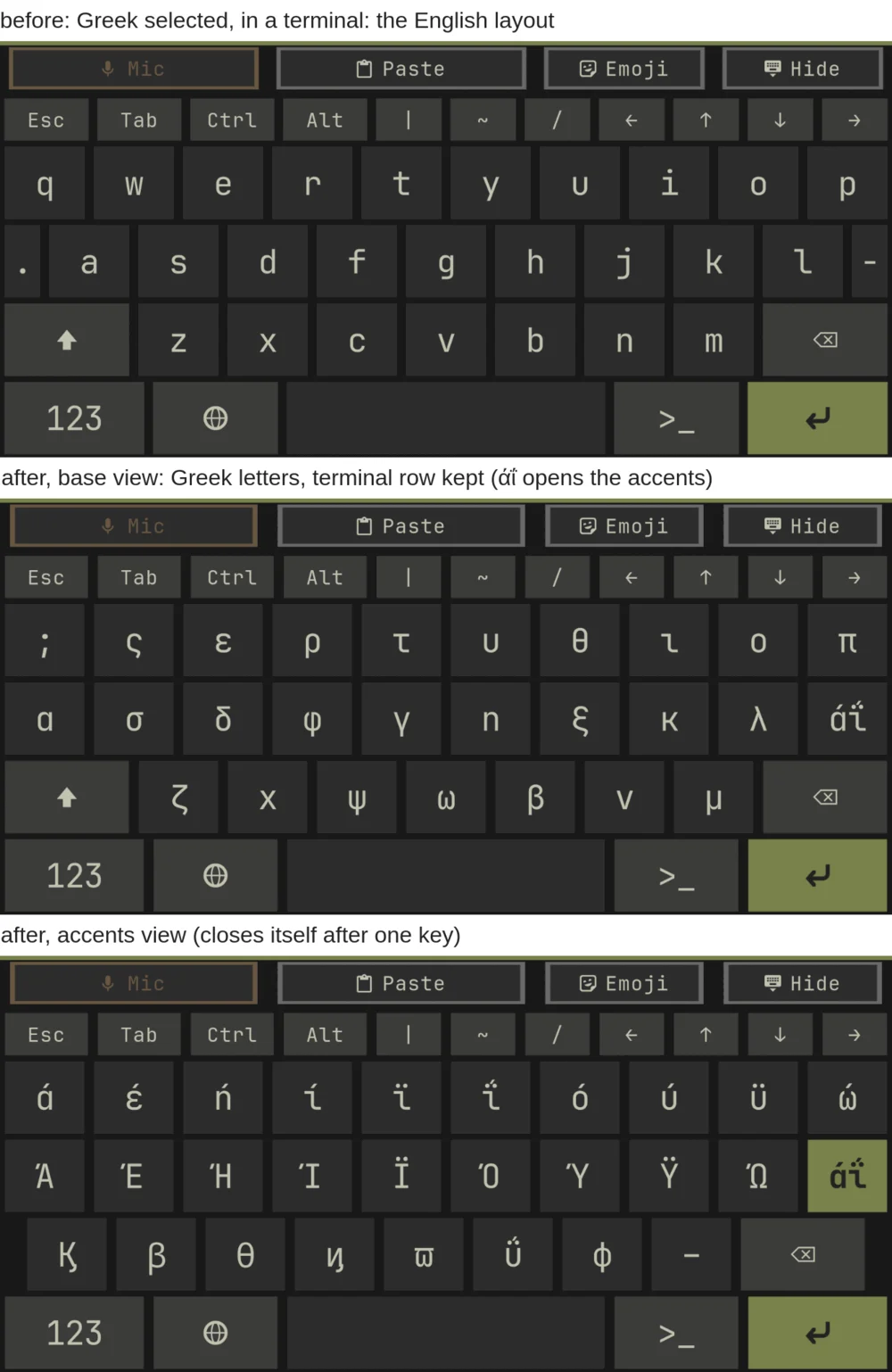
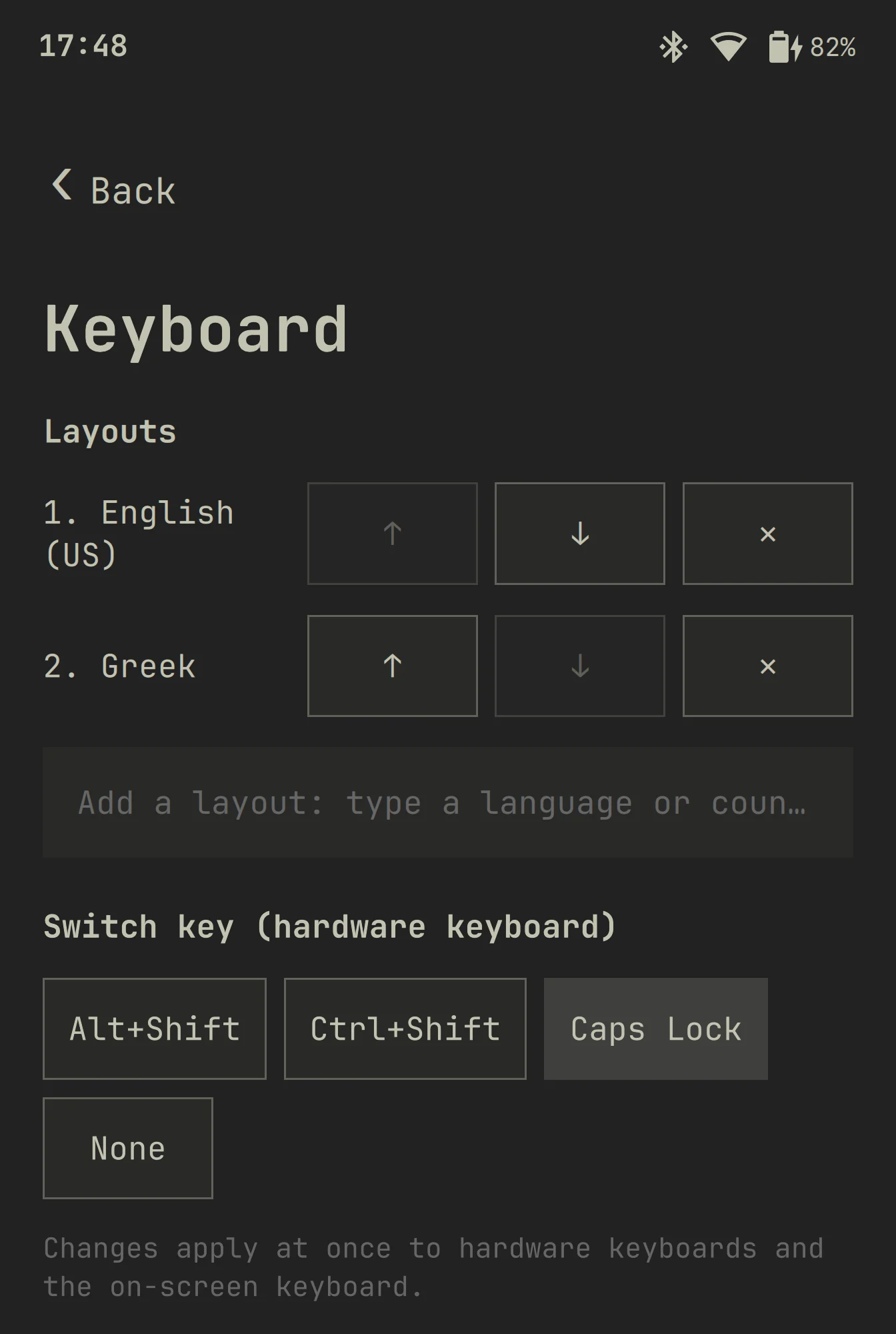
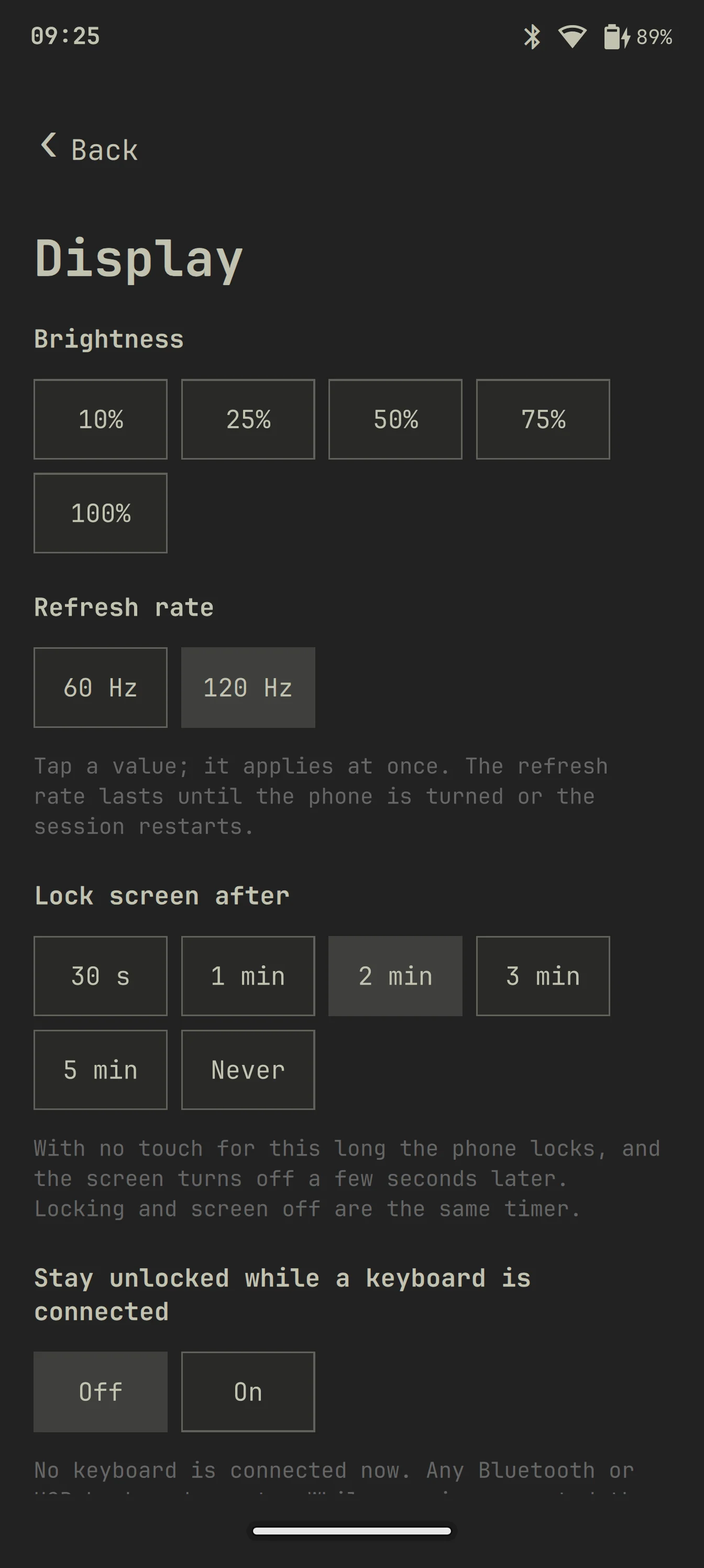
The Keyboard page (#892), and the lock screen timeout on the Display page (#866), both in review.
Smaller things, in review

- The omarchy-trace boot splash, as a Plymouth theme (#945). On my phone Plymouth runs from 3.22 to 5.17 s into the boot.
- A guard that restarts sddm once if its autologin loops (#947).
- The update sheet's progress line wraps and shows pacman's live line (#894), a selection in foot goes to the clipboard too (#895), and the lock re-arms when you change its timeout (#879).
- Two Settings drafts: keyboard haptics levels (#629) and Change PIN (#630).
Where I need help
Everyone is welcome: test any of these pull requests on your phone and say what breaks, bring your own features, or pick one of these up:
- Idle heat, the big one: deeper CPU idle, power domains, a devfreq driver for MIF, and the shell's wakeups with the screen off.
- A review of the charge limits on #761, so 100 % can be done safely.
- Suspend: s2idle wake sources, the RTC alarm, the 2-3 second dead desktop after wake.
- Modem and SIM, GNSS, sensors, fingerprint and cameras on the 8 Pro. None of them work yet.
- Keyboard layouts for more languages (#413).
- Settings pages in the Android style.
If you have a phone with the same charger chip (gitColinX and aninmucek do), a test of the kernel pull requests #265 to #267 at the stock 4.20 V would help a lot. Please no raised float until #761 is reviewed.
The full update, in my own words on GitHub: #867, 20 November. The current state of my phone is on the project page.