 lefteros
LEFTEROS / PERSONAL NOTES
Oma Top Menu: your app's menu on the Omarchy top bar
7 November 2026 / Lef
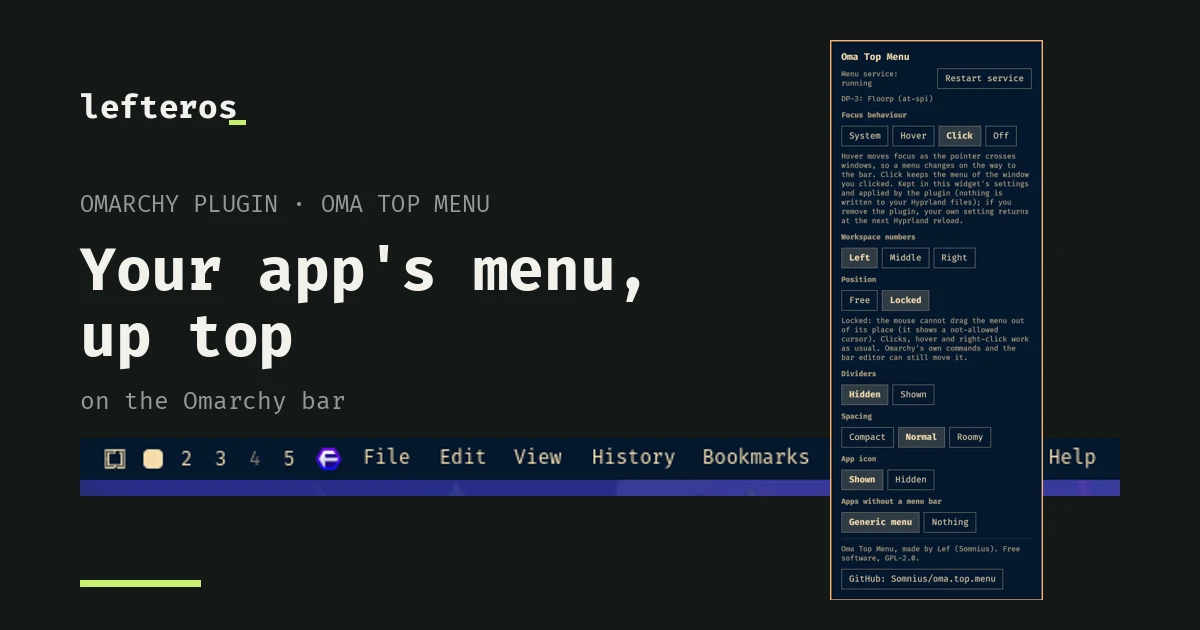
I missed the global menu. On macOS and GNOME, the File, Edit, View of the app you're using sits up on the bar, and on Omarchy I didn't have that. So I made Oma Top Menu, an Omarchy plugin that does exactly that: it takes the app's menu and puts it on the left of the top bar, and the workspace numbers can move to the right.
It's still early, version 0.1.0, free software under GPL-2.0. It isn't on the Omarchy plugin marketplace yet.
How it works
A small background service, started by the plugin itself, reads the menu from the app. It tries org.gtk.Menus first, then dbusmenu, and last the accessibility tree (AT-SPI). The widget on the bar shows the menu, and you click through it as usual.




Floorp, Kotatogram (Qt), Omamail, and a generic menu for an app that has none of its own.
It works with GTK and Qt apps. Apps with no menu of their own, like terminals and many GTK4 apps, get a generic menu, or nothing if you prefer. If you have two windows of the same app, it takes the menu of the window whose title matches.
Each monitor has its own menu. The one you're working on shows the focused window, and the others show the window on the workspace they're displaying. I tested this with a virtual second monitor, not a real one.
Move it or lock it
You drag the menu anywhere along the bar with the mouse, using the Omarchy bar's own drag-and-drop. If you don't want it to wander, you lock it in the options, and then the mouse can't drag it out of place. Clicks work as usual. I tested that with the mouse: four drags, and it didn't move once.

The options
Right-click the menu and the options open. There you have:
- Service status and a Restart service button, for when the menu stops following your windows.
- Focus: System, Hover, Click or Off. Omarchy uses hover by default, so focus changes as the pointer crosses windows, and the menu changes on the way to the bar. With Click you keep the menu of the window you clicked. That's what I recommend. The plugin applies it with
hyprctland doesn't touch any Hyprland file; if you remove it, your own setting comes back at the next reload. - Workspace numbers: left, middle or right.
- Position: free or locked.
- Dividers, spacing, the app icon, and what happens with apps that have no menu.
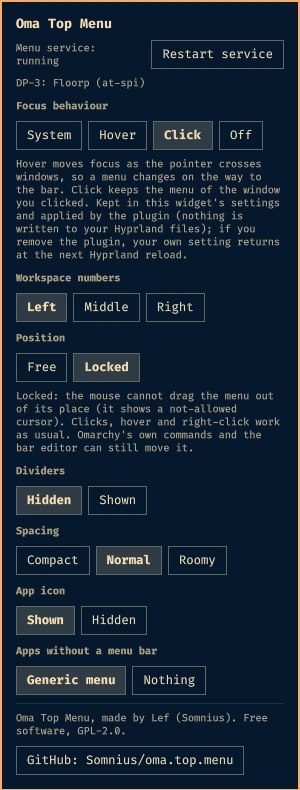
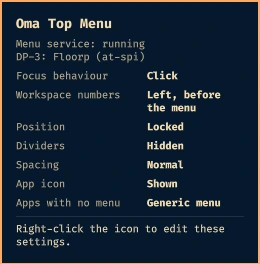
The options on right-click, and the small preview on a left-click of the optional icon next to the tray.
Install and remove
You need Omarchy with the Quattro shell and Hyprland, and the python-gobject and at-spi2-core packages from Arch's official repos. If they're missing, the plugin tells you on the bar.
omarchy plugin add https://github.com/Somnius/oma.top.menu
omarchy bar put com.lefteros.somnius.oma-top-menu --section left
You remove it with a plain omarchy plugin remove com.lefteros.somnius.oma-top-menu. I wanted that clean: it writes nothing to your Hyprland files, and its state lives in a folder that's cleared at logout. If you added the second copy as an icon, a harmless entry stays in shell.json. There's also bin/oma-top-menu-uninstall, which shows you first what it will clean. Every action the plugin takes and how to undo it is written down in docs/actions.md.
I've tested it on Omarchy 4.5.0-3 with Hyprland 0.56.2.
What to know, and what hasn't been tested
- To read menus from Qt and GTK4 apps, the service turns accessibility on for the whole session while it runs. When it stops, it goes back off. I haven't measured what that costs yet.
- Firefox-family browsers (I tried Floorp) only fill a menu after it's been opened once, so some are empty at first. After a click, the plugin looks again about a second later. That has tests, but I haven't seen it live yet.
- I haven't got LibreOffice working yet.
- Apps that were running before the service started need a restart to show a menu.
- I haven't tried a real second monitor, only a virtual one.
- I haven't confirmed by hand yet: the app icon and generic menu buttons, the icon inside the tray drawer, and the GitHub button.
The whole path, phase by phase, is in the ROADMAP, and what was checked and what wasn't is in docs/compatibility.md.
Credits
Oma Top Menu started as a fork of primo.global-menu by PrimoGameStudio (GPL-2.0), and the idea came from the Global Menu for GNOME by Unmade760. I took no code from that one, only inspiration.
Bugs and ideas go in the issues. The Oma Top Menu page will keep the current state.