 lefteros
LEFTEROS / PERSONAL NOTES
Hide Tweetie Mac Dock icon
24 March 2010 / Lefteris Iliadis / SomniusX
Historical text from HellasProject (2009–2014). It is not current advice or a present-day service.

Hide the Tweetie Mac Dock icon and more
A large number of Mac owners have now caught the “Twitter” bug.
What is Twitter?
I will give a short explanation from qwerty.gr …
Twitter is a free social network and micro-blogging service that lets users write short messages and read other users’ messages (the well-known tweets).
Those Mac Twitter users have a small collection of client programs to connect, including Tweetie, Nambu, Twitterrific, and others.

I will stay with Tweetie, which is good and easy to use with many features.
There is a way, for all programs you have on a Mac, to hide the Dock icon — but how?
It will not let me take the Dock icon off, 
that is, run the app normally but only with the icon in the top bar. 
You will need a program such as TextEdit or TextMate to edit a file and follow these simple steps:
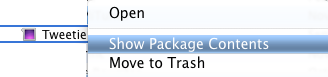
Find the app on disk, right-click, then “Show Package Contents” (image on the right).
- Locate Info.plist and open it with TextEdit or another text editor of your choice (image below)
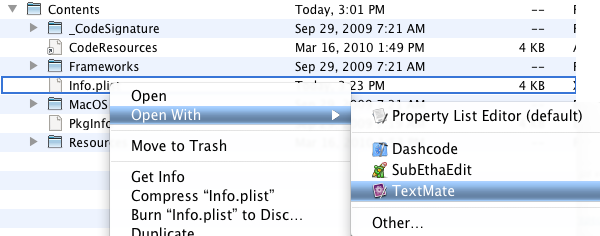
- Write the following key+string
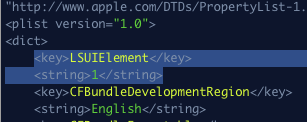
so it looks like the image on the right. Save the file after the change.
Now run Tweetie to see what we achieved.
Right after launch you will notice a malfunction exactly as in the image below.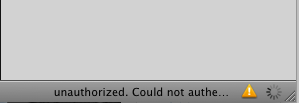
It is telling us it cannot authenticate our details correctly. At this step many who have tried, including me for a while, give up and restore Info.plist to its previous form so Tweetie works again. The point is there is some kind of bug, and it is solved in a very simple way.
Remove and re-add your account, meaning the username and password, as in the images below.
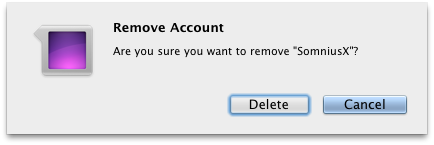
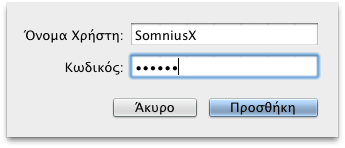
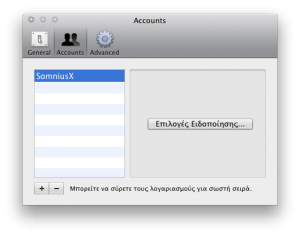
- You will see the program working normally again.
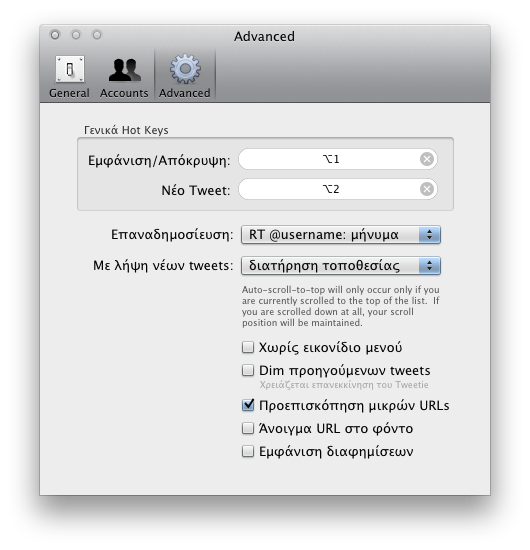
That is it. You now have Tweetie without a Dock icon taking space. If you have a new message the bar icon goes from black to blue. You can also set keyboard shortcuts to call Tweetie or the new-tweet window, as in the image below where I did it.
3 comments on the original.