 lefteros
LEFTEROS / PERSONAL ARCHIVE
 Soon
RecMeets — private meeting recording with local transcription
26 September 2026 / Lefteris Iliadis / SomniusX


Coming soon. RecMeets is in its last steps before the first release. This page tracks its progress — what it already does, what is left, and what to expect.
The latest version is v0.31.0 (11 October 2026): both tracks stay in step when a device stalls, and actions can run by themselves. Why it came out.
The idea is simple: a Teams, Meet or Zoom meeting gets recorded and transcribed on your own computer. No bot joins the call. By default, no audio file leaves the machine. At the end you get a transcript with speaker names, chapters, a player and ready-made minutes.
First run in v0.31.0: the models download once — here at a simulated speed — and then the meeting is transcribed on your computer.
What it is
RecMeets is an app for Linux (any distribution with PipeWire or PulseAudio) and Windows 10/11. It records two separate tracks: your microphone and whatever the computer plays — you and everyone else. Plug in a headset mid-call and the recording follows it automatically; both tracks stay in step even if a device stalls or switches.
Transcription runs locally with Whisper (on the GPU or the CPU, about 100 languages) or NVIDIA’s very fast Parakeet (25 European languages, Greek included). You can set a separate language for each side — say, you speak Greek and the other side English — and choose which GPU, or the CPU, it runs on.
What it does
- Who said what. The two tracks separate your side from the other side, and NVIDIA’s Nemotron model tells several voices apart on one side or in an imported file. A cheap or noisy mic doesn’t lose your words, a mic with nobody speaking gets no made-up lines, and echo from your speakers or a leaky headset isn’t counted as another speaker.
- Import any recording: mp3, m4a/mp4 (Teams recordings too), wav, flac, ogg or webm — no ffmpeg needed.
- Check words. The words that were probably misheard, with the audio of each place. Fix a name once, everywhere, and it is remembered next time. A second opinion comes from Laya, my own model, on your computer, or from TypeSafe’s Jev in the cloud with your key.
- Minutes of the meeting, full or short, in the meeting’s language, from a local model (LM Studio, Ollama, llama.cpp) or, if you choose, a cloud service. Every point cites the lines it comes from. Export to Word, PDF, Markdown or images, with your own letterhead. Beside them, MoM-Project: formal minutes laid out like a project office’s template, in Greek or English.
- Projects. Every meeting is a
.recmeetsfile: reopen it where you left it, send it as one file, go back to earlier versions. Nothing you type is lost. - Recognising voices — off unless you choose it, and only with the person’s agreement: known voices are suggested by name in later meetings. Type a name it already remembers and the voice joins that person, unless it clearly sounds like someone else; then it’s kept apart and RecMeets says so.
- Subtitles from the transcript, to Netflix’s and the BBC’s rules: they follow the video’s shot changes, can describe sounds (SDH), be translated into another language or burned into a copy of the video.
- From a link, and video: a YouTube page or a file’s link is fetched and transcribed; a video is kept with the meeting, and frames can be placed on transcript lines.
- Chapters for long meetings, from your own AI helper, and actions: your own scripts that run on a finished meeting, from the menu or by themselves every time a transcript is done.
- First steps and a guide: short tours the first time each screen opens, a meeting page that highlights the next step, and a how-to guide with eighteen topics in Settings.
- On Omarchy it follows the theme and offers a bar widget; on tiling window managers it opens as a small floating window.
- Local model servers found by themselves (LM Studio, Ollama, llama.cpp), with ways to install the one you don’t have.
- Keyboard: Tab, Enter and Space work on every button, with a ring that shows where you are.
- Command line for recording, transcribing files and controlling the open window from keybindings;
recmeets start <name>starts a named recording and opens RecMeets first if it isn’t running.
Screens
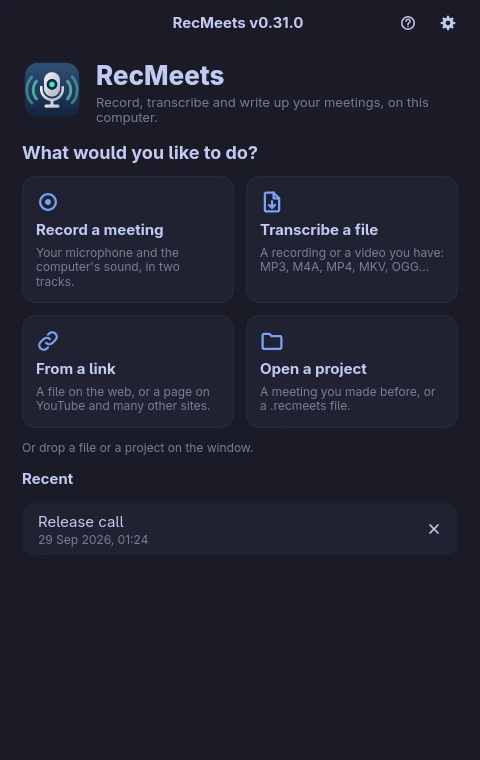
The home screen: record, transcribe a file, from a link, or open a project.
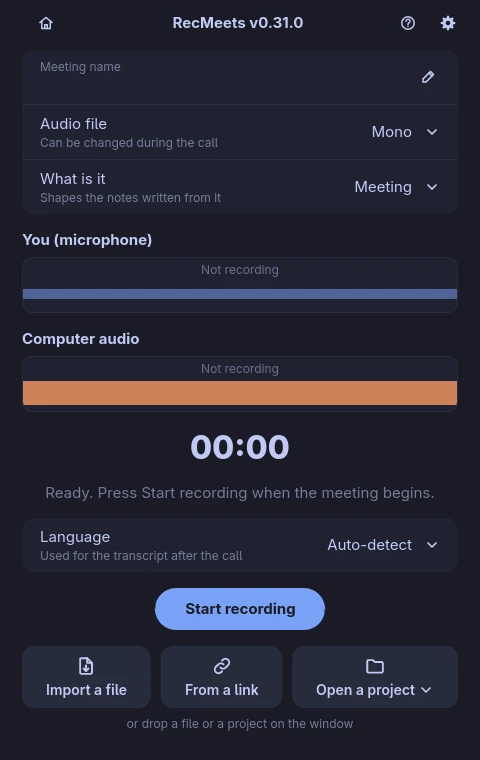
Record two tracks: your microphone and the computer’s sound.
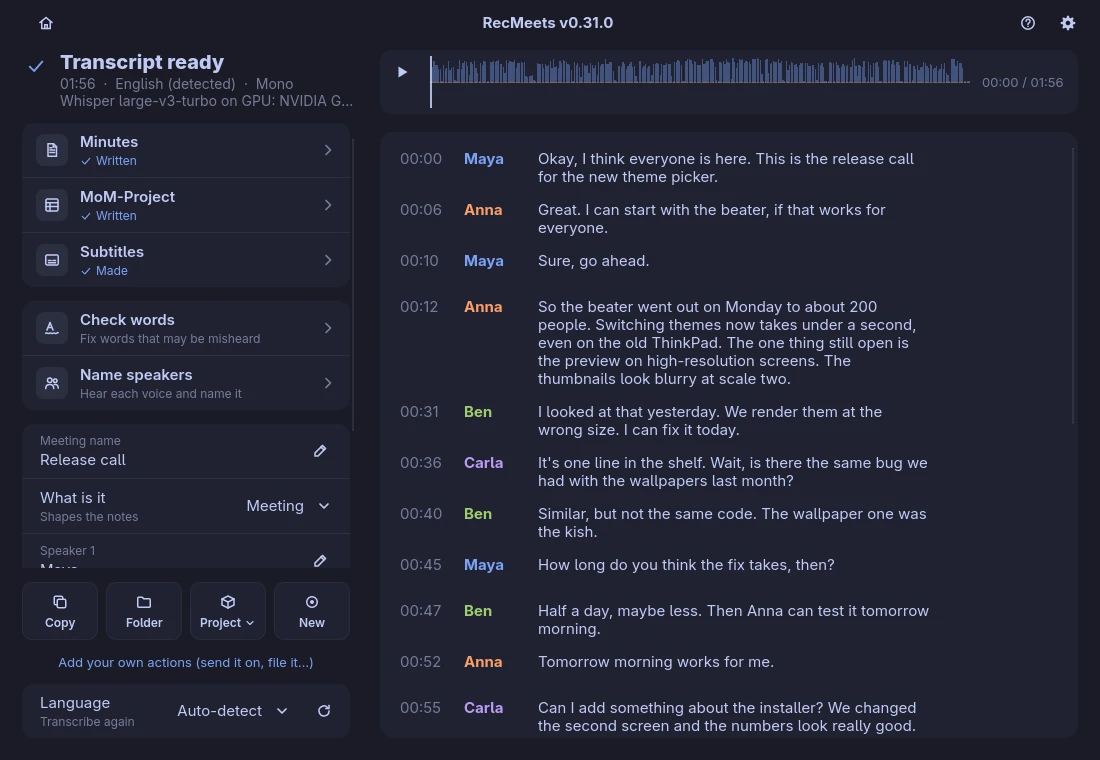
A meeting: what to write up, what to put right, and the transcript with the player.
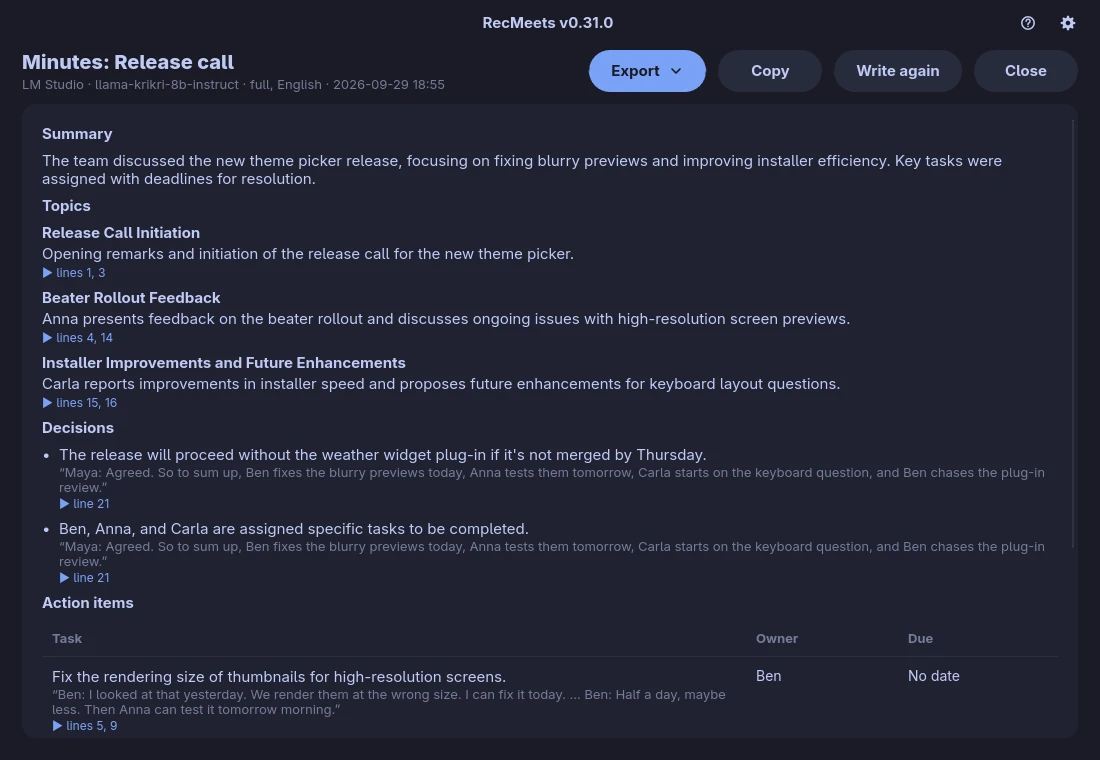
Minutes from a local model, every point cited.
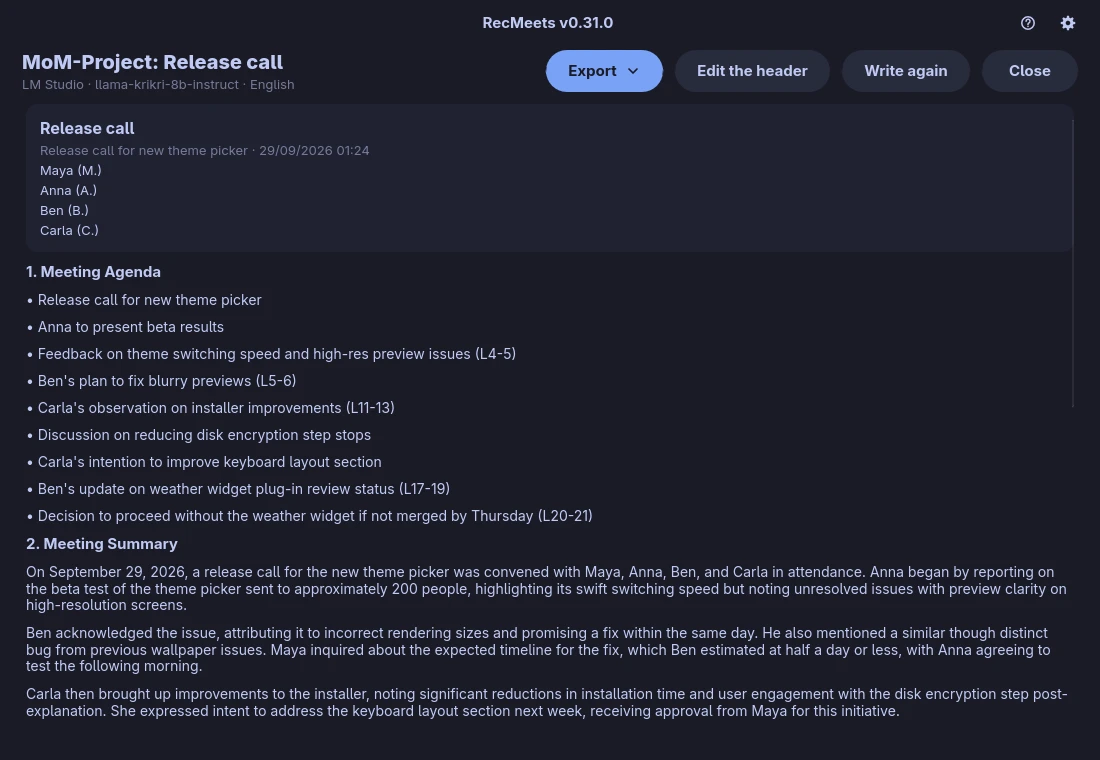
MoM-Project: formal minutes in a project office’s layout.
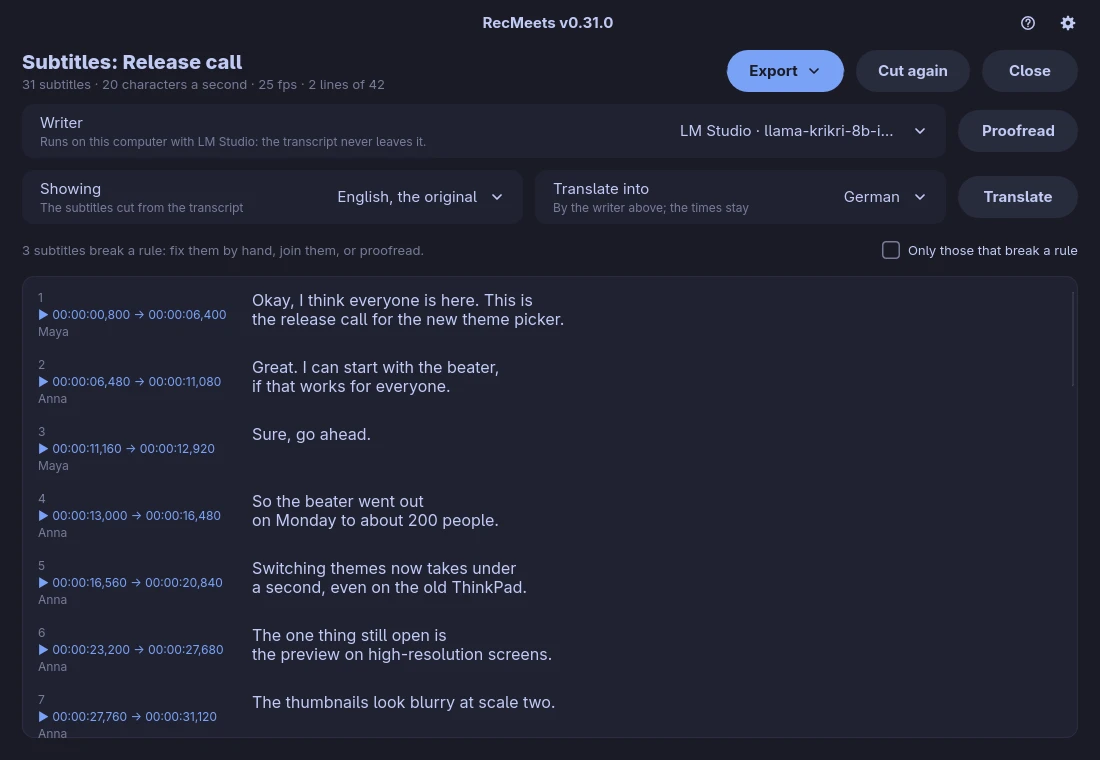
Subtitles cut to Netflix’s and the BBC’s rules, ready to proofread or translate.
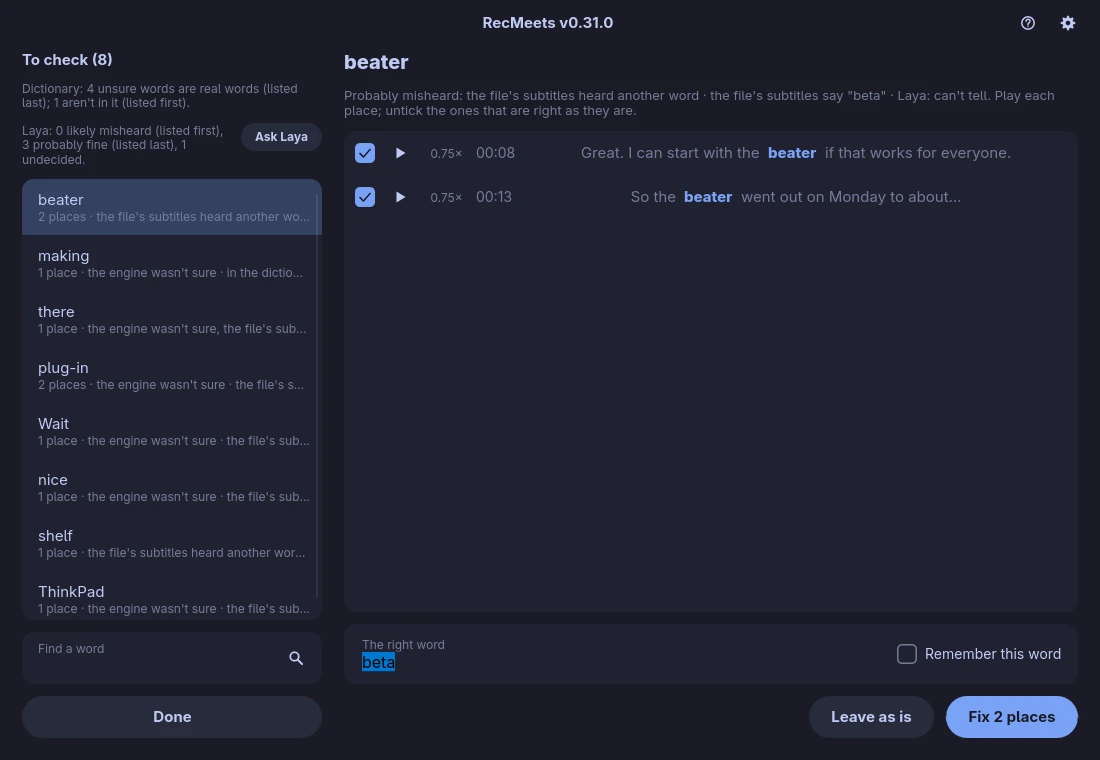
Check words: hear each place and fix it once, with a second opinion from Laya.
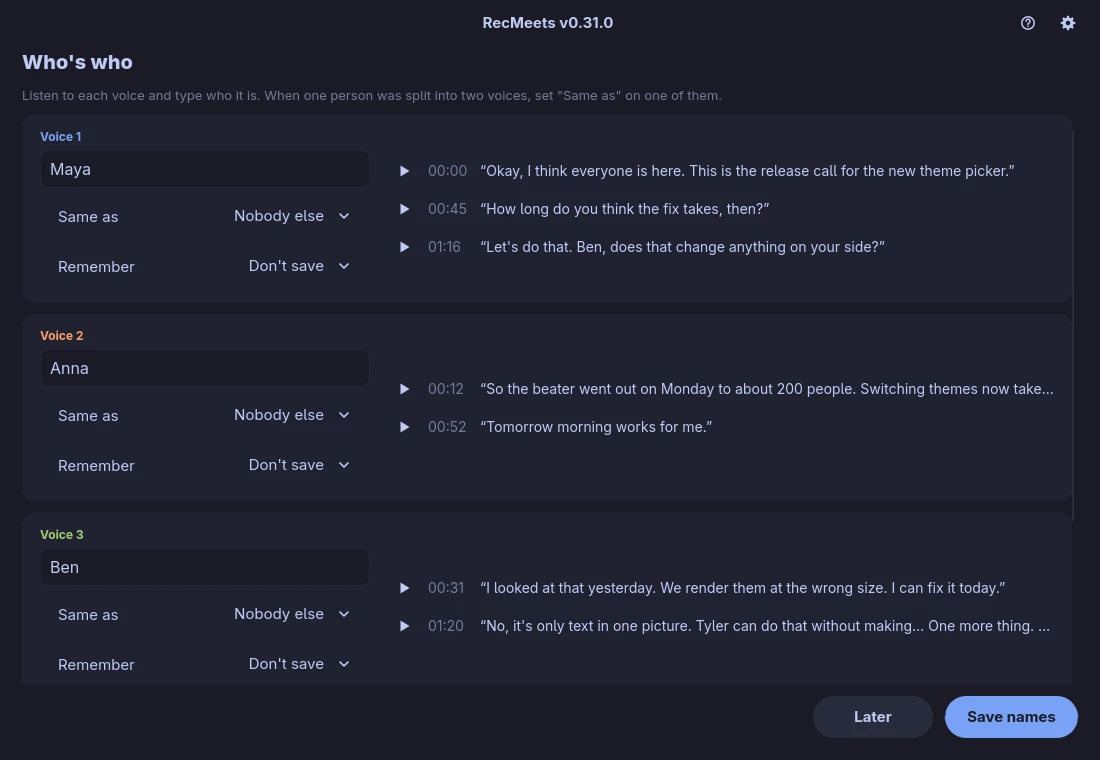
Who is who: name the voices and, with consent, remember them.
The screens are from v0.31.0, on a demo meeting with invented content; the minutes were written by a local model, on the same computer.
Privacy
With Whisper or Parakeet, audio and transcripts never leave your computer; the models download once. Anything that sends something out is optional, and the app asks first:
- The Gemini (Google) and Scribe v2 (ElevenLabs) engines upload the audio to their servers, with your own key.
- Minutes or chapters from a cloud service send the meeting’s text to it.
- Check words with Jev (TypeSafe) sends the words to check to TypeSafe, with your own key. Laya does the same job on your computer.
Progress so far, phase by phase
The work is split into phases, each closed by a gate. So far:
- Foundations and risk checks — done. Microphone and system audio recorded on Linux and Windows with no timing drift.
- Platform layer — done. Audio encoding, recording and playback inside the app, shared by Linux and Windows, with no external tools.
- New interface (0.2) — done. Record page, meeting view, settings, a compact control strip.
- Minutes of the meeting (0.3) — done, with citations and export to Word, PDF, Markdown and images.
- Projects and voices (0.4) — done, with voice recognition giving the same results on the GPU and the CPU.
- The guide (0.5) — done: first steps and fourteen how-to topics.
- Packages (0.6) — done: AppImage and tar.xz for Linux, an installer and a portable build for Windows.
- Terms, activity log, drag and drop (0.7 to 0.11) — done, with drops working natively on Wayland too.
- Links, video, subtitles, MoM-Project (0.12 to 0.18) — done, with a home screen and local model servers.
- Laya and better imports (0.19 to 0.25) — done: my own model in Check words, quiet voices no longer lost in imported files, translated subtitles, sound descriptions, subtitles on shot changes.
- Real meetings and the original’s fixes (0.26 to 0.31) — done: voice suggestions tuned on real meetings, a meeting page that says what to press, the keyboard, a noisy mic that no longer loses words, and both tracks in step when a device stalls.
- Next: more testing on real hardware. 1.0.0 will be the first complete release.
Technologies used


















- Rust — a single executable, fast and free of heavy dependencies; the interface in Slint.
- whisper.cpp (Vulkan or CPU) and NVIDIA’s Parakeet — local speech recognition.
- Nemotron through ONNX Runtime — local speaker detection.
- cpal, Opus and Symphonia — recording, playback, compression and audio decoding, with no external tools.
- Typst — the meeting minutes as a PDF.
- llama.cpp, LM Studio or Ollama — a local model for chapters and minutes.
- Gemini — an optional cloud engine from Google, only if you switch it on with your own key; then the audio is uploaded to Google.
- ElevenLabs — the optional Scribe v2 engine, with your own key; then the audio is uploaded to ElevenLabs.
- OpenRouter — minutes from many hosted models, with your own key; the transcript goes to OpenRouter and the model’s provider only after you say yes for that meeting.
- Hugging Face — where the speech, speaker and voice models download from, once, and where my own model, Laya, lives.
- yt-dlp, deno and FFmpeg — fetching from YouTube and many other sites, and working with video; they download from their makers only when first needed.
Each badge links to the project’s page. The logos belong to their owners.
Origins
RecMeets started as a port of Meeting Recorder by Jankees van Woezik (MIT licence), which ran only on Omarchy/Arch. Its transcription pipeline, speaker handling, chapters and actions come from there. Here it becomes a standalone app for any Linux and for Windows, with more engines, languages and hardware choice.
Availability
RecMeets is headed for commercial release to businesses and individuals. Its source code is not public. If you are interested, get in touch.
When
Soon. Every version is tested on Linux and Windows, installers included, before it comes out; 1.0.0 comes once the last checks pass. Until then, this page will be updated as the work moves on.