 lefteros
LEFTEROS / PERSONAL ARCHIVE
Windows VM for Omarchy
27 September 2026 / Lefteris Iliadis / SomniusX
Omarchy has a built-in Windows VM: omarchy-windows-vm install sets up Windows 11 running in a container, which you open over RDP. Windows VM for Omarchy is my plugin that gives it a place on the bar: a small Windows logo that shows at a glance whether the VM is running, and a panel with everything you need to manage it. Version 1.0.0, MIT licence.
What it does
- Status on the bar. The logo is bright while Windows runs, dim when it is stopped, and pulses while it starts or shuts down. Hover it for details, e.g. Windows running · up 1h 5m · RDP open.
- One click to the desktop. If the RDP window is already open on another workspace, you are taken to it. If it was closed, it reconnects. If Windows is not running, it starts it.
- Restart and shut down, with a safety catch. Both ask for a second click, because Windows closes every app it is running.
- Keep Windows running (optional). By default, closing the RDP window shuts Windows down, just like Omarchy’s own launcher. With this on, only the window closes; apps, SSH sessions and background jobs carry on.
- A log for every start, restart and shutdown, with FreeRDP’s own messages. When an RDP session drops unexpectedly, the log says why.
- Web console and help. The VM’s screen in your browser — useful while it boots or if RDP will not connect — and a Help section that explains every button.
On the bar and in the panel
- Left-click: opens the panel.
- Right-click: goes to the Windows desktop (starting Windows if needed).
- Hover: status, uptime and whether the RDP window is open.
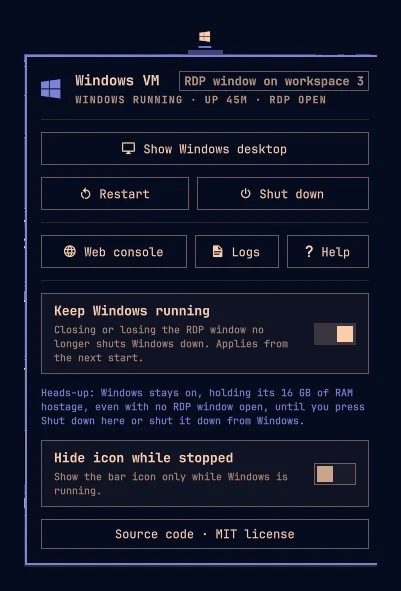
In the panel, the main button follows the state — Show Windows desktop, Reconnect RDP or Start Windows — followed by Restart, Shut down, Web console (http://127.0.0.1:8006), Logs, Help and two settings: Keep Windows running and Hide icon while stopped. Shutting down from the Windows Start menu works too; the icon dims once the VM has stopped.
“Keep Windows running”: the trade-off
Omarchy’s launcher treats a closed RDP window as “I am done” and shuts Windows down. With the option on, only the window closes, and next time you are back in the same session with your apps as you left them.
The price: the VM keeps the RAM you gave it at install time (RAM_SIZE) until you press Shut down or shut it down from Windows. So while the option is on, the panel shows a reminder with the exact amount — e.g. holding its 16 GB of RAM. The setting applies from the next start or reconnect made through the plugin.
Install
omarchy plugin add https://github.com/Somnius/Windows-VM-for-Omarchy.git --enable
Requirements: Omarchy with the Windows VM installed (omarchy-windows-vm install) and Docker access. If your user is in the docker group, the icon updates silently; otherwise the status stays unknown, and starting or stopping asks for your password as usual. There are no other dependencies: it only uses tools Omarchy already ships — omarchy-windows-vm, docker, hyprctl and uwsm-app.
From the command line
Every panel action is also a command, so it binds easily to a Hyprland shortcut:
omarchy-shell lef.windows-vm show       # the desktop, or start/reconnect
omarchy-shell lef.windows-vm restart
omarchy-shell lef.windows-vm stop
omarchy-shell lef.windows-vm status     # state as JSON
omarchy-shell lef.windows-vm toggle     # open/close the panel
How it works
Omarchy’s VM, underneath
omarchy-windows-vm runs Windows 11 in the dockurr/windows container: QEMU with KVM acceleration inside a privileged Docker container, with the RAM, cores and disk you choose at install. It exposes only on 127.0.0.1 port 8006 (the web console) and 3389 (RDP), and the launcher connects with FreeRDP (xfreerdp3) with sound, microphone, clipboard and dynamic resolution, in a window titled Windows VM - Omarchy. The ~/Windows folder is shared with Windows. The docker compose file is owned by root and also holds the Windows account password.
Status without touching the password
Every 5 seconds (every 2 while an action runs) the plugin asks Docker about the omarchy-windows container with a narrow docker inspect template: the state, the start time, and only the RAM_SIZE variable, picked out inside the template. Because the container’s environment also holds the Windows password, the plugin never receives it.
The answer becomes one of six states: running, stopped, absent (no container — it then checks whether the VM is installed at all, at the current or the legacy compose location), no-access (no Docker permission), docker-down and error. The start time gives the uptime (2d 3h, 1h 5m, <1m), and RAM_SIZE=16G becomes “16 GB” for the reminder.
The RDP window
In parallel, hyprctl clients -j says whether a window with the RDP title exists, its address and its workspace. “Show Windows desktop” focuses exactly that window — the address is first checked to be hexadecimal before it is handed to hyprctl — with Hyprland’s new Lua dispatcher syntax and the classic focuswindow as a fallback.
Actions that survive a shell restart
Start, restart and shutdown run through Launch.sh, which calls Omarchy’s own launcher (omarchy-windows-vm launch, launch --keep-alive or stop) and is started detached through uwsm-app, in its own systemd scope. So an open RDP window does not close if the Omarchy shell reloads.
While an action is pending, the plugin knows it has finished from what it can see: a start when the VM is running and RDP is open, a restart only after it first saw the VM stopped and then running again, a shutdown when it is no longer running. After 4 minutes it stops waiting and points to the log.
An Omarchy bug, worked around safely
Omarchy’s launcher requires ~/Windows to be mode 700, but Dockur’s Samba sets the setgid bit, which chmod 0700 keeps — and the launcher refuses to start (omacom/omarchy#10256). Before every start, Launch.sh clears only that bit, only on your own folder: if it is not a symbolic link and you own it.
Logs
Each action writes one file to ~/.local/state/windows-vm/logs/ (it follows $XDG_STATE_HOME), e.g. launch-20260927-101545.log, in a folder with mode 700; the 30 newest are kept. FreeRDP runs with WLOG_LEVEL=INFO, because at the default WARN level it does not record why a session ended.
Settings and boundaries
The two settings are saved to ~/.config/omarchy/windows-vm/config.json and picked up live if the file changes. The plugin never edits the VM’s Docker configuration, never needs root, and removing it leaves the VM and its disk untouched.
Tests
All the logic (reading docker inspect, finding the window, uptime, RAM formatting, when an action is done, the summary) lives in a pure JavaScript module with no Quickshell imports, so Qt 6’s qmltestrunner checks it offscreen with eight test groups. tests/run.sh also checks Launch.sh’s syntax and that it rejects unknown actions.
Sources and date
First release: 2026-09-27. The plugin has been approved for the Omarchy plugin marketplace and will appear there with the next update cycle.
Remove it with omarchy plugin remove lef.windows-vm (and optionally rm -rf ~/.config/omarchy/windows-vm ~/.local/state/windows-vm for settings and logs). License: MIT.