 lefteros
LEFTEROS / PERSONAL ARCHIVE
EucWorldPebble
29 March 2022 / Lefteris Iliadis / SomniusX
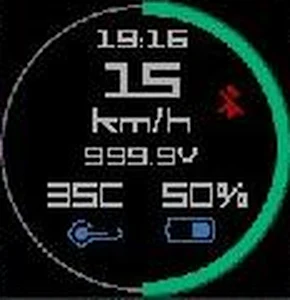
EucWorldPebble is a watchapp for Pebble watches that brings your electric unicycle (EUC) figures from the EUC World Android app to your wrist: speed on a big gauge, battery, temperature, voltage and the time, with a vibration whenever an alarm goes off. On a unicycle, a glance at your wrist is safer than the phone in your pocket.
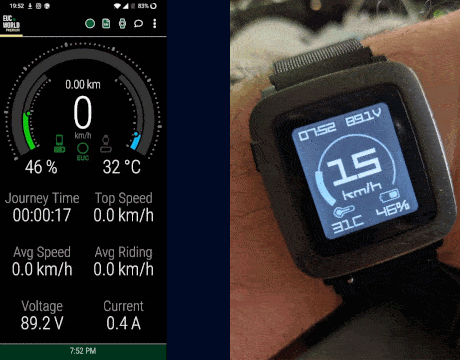
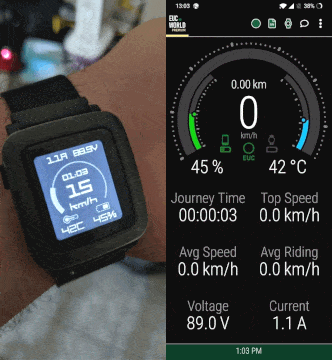
Left, version 1.0tv (time and voltage, big speed); right, 1.0cv (current and voltage). Each animation alternates the watch with EUC World’s screen at the same moment.
What it shows
- Speed in big digits, inside an arc that fills up to the maximum speed you set on the phone. On colour Pebbles the arc turns from green to yellow, orange and red as you near the limit.
- Battery of the unicycle, with an icon in 10% steps.
- Temperature, with an icon that turns red when the fan comes on.
- Voltage (V) top right, and depending on the version the time or the current (A) top left.
- A Bluetooth icon when the connection drops.
- A second screen with details: ride time, distance and top speed.
- km/h or mph, as set in EUC World.
Buttons and vibrations
- Up / Down: switch between the gauge and the details, with a sliding transition.
- Select: horn, from the phone.
- Long Select: opens EUC World on the phone, with a short vibration to confirm.
- Alarms: EUC World forwards alarms to the watch, and each kind has its own vibration pattern — three long buzzes for speed, a run of short ones for current — so you know what is happening without looking.
Two versions
| Version | Top left | Top right | Speed | Watches |
|---|---|---|---|---|
| 1.0tv | time | voltage | big digits | every Pebble |
| 1.0cv | current | voltage | smaller digits, with the time inside the arc | Pebble Time / Time Steel only (basalt) |
Both came out on 2 August 2020 and are ready as .pbw files under Releases.
On every Pebble
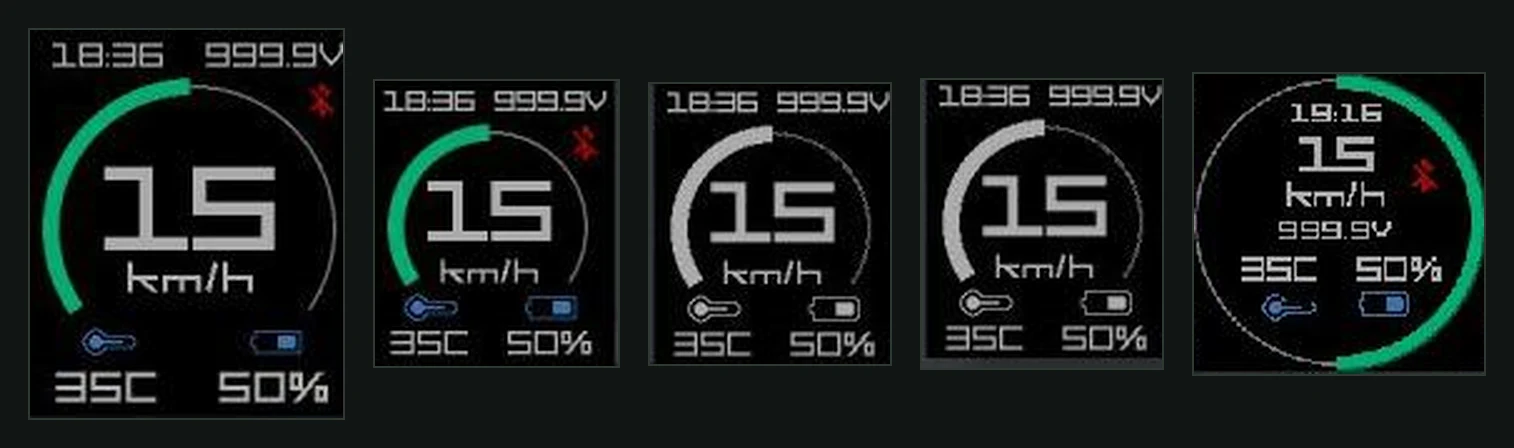
1.0tv in the Pebble SDK emulators: Time 2, Time, the black-and-white Classic and Pebble 2, and the round Time Round.
The same watchapp builds for every Pebble platform: aplite (Classic, Steel), basalt (Time, Time Steel), chalk (Time Round), diorite (Pebble 2) and emery (Time 2). There are three screen layouts — 144 px rectangular, large rectangular for the Time 2, and round — and the compiler picks the right one by itself.
Install
Pebble has shut down, so it takes a little preparation:
- Install the Pebble app on Android. It is no longer on the Play Store; the README points to the last APK on APKMirror.
- Set it up with Rebble, the community that keeps Pebble’s services alive.
- Download the
.pbwof the version you want from Releases. - Open it with a file manager (e.g. Cx File Explorer) and choose the Pebble app; it loads onto the watch.
How it works
Watch and phone
It is a Pebble watchapp written in C with Pebble SDK 3. All communication goes through AppMessage, Pebble’s messaging system: EUC World sends dictionaries with keys such as speed, battery, temperature, voltage, current, ride_time, distance, top_speed and vibe_alert, and the watch answers with play_horn, start_app and displayed_screen. With that last one the phone knows which of the two screens you are looking at. On launch the watch sends ready with its version.
Speeds travel as integers in tenths of a km/h (24.5 km/h = 245), so the watch never needs floating point; conversion to mph happens on the watch. The maximum speed and the unit are stored in the watch’s memory (persist), so the gauge is right from the first moment.
The gauge
The arc is drawn with graphics_fill_radial and never jumps to the new value: a 30 ms timer moves it towards the target by at most 8 degrees per step, so it sweeps smoothly like an analogue needle. The colour thresholds come from the maximum speed: green up to half of it, then yellow, orange and red in equal steps. On black-and-white watches the arc stays white.
A frugal font
The digits are in SF Square Head Bold, loaded at several sizes. Because a Pebble has very little memory, each size keeps only the characters it needs (e.g. just 0–9 for the speed, 0–9 V : . for the voltage), and the very large sizes are built only for the platforms that use them.
Development
pebble build
pebble install --emulator basalt build/EucWorldPebble.pbw   # aplite, basalt, chalk, diorite, emery
pebble install --phone <phone IP> build/EucWorldPebble.pbw
The repository also has a small build-run.sh that builds and opens the emulator in one go. For a development environment today, the willow.systems Pebble dev VM comes with the SDK ready.
History and thanks
- 2016–2017: the base is WheelLogPebble by JumpMaster (Kevin Cooper), WheelLog’s Pebble app: round Pebble, black-and-white models, mph, horn, alarms and the details screen.
- 2019–2020: my fork points it at EUC World, the Android app by Sebastian Łastowski (slastowski), starts the voltage-and-current layout, and ships the two versions as ready
.pbwfiles. - July–August 2020: contributions from Alexandros Kintis: voltage and current, the time in place of current, and support for aplite, diorite and emery.
- 29 March 2022: the last change — initial values start at zero instead of the demo values I used for testing in the emulator.
Sources and date
Last change in the repository: 2022-03-29. Versions 1.0cv and 1.0tv: 2020-08-02.