 lefteros
23 Οκτωβρίου 2025 / Lefteris Iliadis (SomniusX)
Lazygit - Git Management που θα σε κάνει να ξεχάσεις το GUI! 🚀
23 Οκτωβρίου 2025
Γεια σας και πάλι!
Γεια σας και πάλι!
Μετά από το lazydocker, ήρθε η ώρα να μιλήσουμε για το lazygit - το αδελφάκι του που θα αλλάξει τον τρόπο που δουλεύεις με το Git!
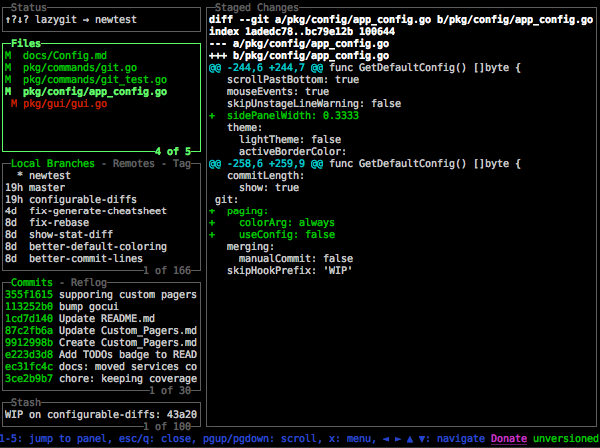
Τι είναι το Lazygit;
Το lazygit είναι ένα TUI (Terminal User Interface) για το Git. Φαντάσου το GitHub Desktop ή το GitKraken, αλλά μέσα στο terminal σου, χωρίς να καταναλώνει 500MB RAM, και με keyboard shortcuts που σε κάνουν πύραυλο!
Αντί να γράφεις συνέχεια:
git status
git add .
git commit -m "message"
git log --oneline
git diff
git branch
git push
Απλά γράφεις lg και έχεις ΟΛΑ αυτά μπροστά σου σε ένα interactive interface!
Γιατί να το χρησιμοποιήσω;
Σύγκριση με άλλα tools:
| Feature | Lazygit | GitHub Desktop | GitKraken | Terminal Git |
|---|---|---|---|---|
| Ταχύτητα | ⚡⚡⚡ | 🐌 | 🐌🐌 | ⚡⚡ |
| Resources | ~10MB | ~300MB | ~500MB | Minimal |
| Keyboard-first | ✅ | ❌ | ⚠️ | ✅ |
| Works over SSH | ✅ | ❌ | ❌ | ✅ |
| Δωρεάν | ✅ | ✅ | ⚠️ (freemium) | ✅ |
| Learning Curve | Χαμηλή | Χαμηλή | Μέτρια | Υψηλή |
Highlights:
- Stage/Unstage αρχεία με Space
- Commit με
c - Push/Pull με
P/p - Βλέπεις diff, logs, branches, stashes ταυτόχρονα
- Interactive rebase χωρίς να χρειάζεται να θυμάσαι εντολές
- Merge conflicts resolution με style
- Cherry-pick, revert, amend με 2 πλήκτρα
Πότε είναι must-have;
- Όταν δουλεύεις σε remote server μέσω SSH (ΣΟΥΠΕΡ χρήσιμο λέγω)
- Όταν θέλεις να είσαι γρήγορος (keyboard > mouse)
- Όταν κάνεις complex git operations (rebase, cherry-pick κλπ)
- Όταν δεν έχεις luxury για Electron apps που τρώνε 500MB
- Όταν θέλεις να φαίνεσαι cool στα standup meetings 😎 (hoho 😘)
Το Installation Script
Όπως και με το lazydocker, έφτιαξα universal installer που δουλεύει ΠΑΝΤΟΥ:
- Fedora, Nobara, RHEL, CentOS
- Arch, CachyOS, Omarchy, Manjaro, EndeavourOS
- Ubuntu, Debian, Linux Mint, Pop!_OS
- OpenSUSE, SLES
- Και οτιδήποτε άλλο τρέχει Linux!
Το script:
- Auto-detect system & architecture
- Κατεβάζει την τελευταία stable version
- Κάνει install στο
/usr/local/bin - Προσθέτει alias
lgγια ευκολία - Δουλεύει σε bash, zsh, και fish shells
Bonus: Windows WSL Support
Όπως και το lazydocker, τρέχει άψογα σε WSL! Αν δουλεύεις με Windows αλλά έχεις WSL για development, το lazygit είναι game changer.
Εγκατάσταση
# Download the script
wget https://your-link.com/install-lazygit.sh

# Make it executable
chmod +x install-lazygit.sh

# Run it
./install-lazygit.sh
Μετά:
source ~/.bashrc  # ή ~/.zshrc

# Navigate to any git repo
cd /path/to/your/project
lg  # ή lazygit
Keyboard Shortcuts (Basic)
- Arrow keys: Πλοήγηση
- Space: Stage/Unstage files
- c: Commit
- P: Push
- p: Pull
- a: Stage all
- d: Diff/View changes
- Enter: Expand/View details
- x: Command menu
- ?: Help (δες όλα τα shortcuts!)
- q: Quit
Pro Tips
- Interactive Rebase: Πήγαινε στα Commits (αριστερό panel), πάτα
eγια edit - Branch Management: Tab για να πας στο Branches panel, δημιουργία/διαγραφή/merge με
n/d/M - Stash:
sγια stash,gγια pop - Undo:
ctrl+zγια να κάνεις undo το τελευταίο commit (πριν το push!) - Custom Commands: Μπορείς να προσθέσεις δικά σου Git commands στο config!
Η προσωπική μου εμπειρία
Από όταν ανακάλυψα το lazygit πριν λίγο καιρό:
- ❌ Δεν έχω ξανανοίξει GitKraken (έληξε η license και δεν με νοιάζει)
- ❌ Δεν χρησιμοποιώ τα Git plugins του VSCode/κλπ
- ❌ Δεν γράφω git commands manually (εκτός από
git clone) - ✅ Είμαι 10x ταχύτερος στο Git workflow
- ✅ Κάνω rebase/cherry-pick χωρίς να ψάχνω στο Google (αααχ)
- ✅ Το terminal μου θα μπορούσε να είναι πάντα open με
tmux + lazygitή έστω σε ξεχωριστό, ανάλογα το DE/WM σας.
Σοβαρά, το lazygit με έκανε να νιώσω comfortable με advanced Git operations που πριν τις απέφευγα.
Συνδυασμός Lazygit + Lazydocker = 🔥
Αν έχεις και τα δύο:
lgγια Git managementlzdγια Docker management
Δεν χρειάζεσαι ΤΙΠΟΤΑ άλλο για development workflow. Terminal + Editor + αυτά τα δύο = perfection.
Δοκιμάστε το και θα καταλάβετε γιατί το λατρεύω!
Happy Git-ing! 🚀
Ναι αλλά κάτσε που είναι το actual script, για πάμε
#!/bin/bash

# Script to install lazygit on any Linux distribution
# Supports all major distros and their forks (Nobara, CachyOS, Omarchy, etc.)
# Includes shell integration for bash, zsh, and fish

set -e

# --- Configuration ---
LAZYGIT_INSTALL_DIR="/usr/local/bin"
GITHUB_API_URL="https://api.github.com/repos/jesseduffield/lazygit/releases/latest"
TMP_DIR="/tmp/lazygit_install"

# --- Colors for output ---
RED='\033[0;31m'
GREEN='\033[0;32m'
YELLOW='\033[1;33m'
BLUE='\033[0;34m'
NC='\033[0m' # No Color

# --- Helper Functions ---
verbose() {
    echo -e "${BLUE}[INFO]${NC} $1"
}

success() {
    echo -e "${GREEN}[SUCCESS]${NC} $1"
}

warning() {
    echo -e "${YELLOW}[WARNING]${NC} $1"
}

error() {
    echo -e "${RED}[ERROR]${NC} $1"
    exit 1
}

check_command() {
    if ! command -v "$1" &> /dev/null; then
        return 1
    fi
    return 0
}

# --- Check for required dependencies ---
check_dependencies() {
    verbose "Checking for required dependencies..."

    local missing_deps=()

    if ! check_command curl && ! check_command wget; then
        missing_deps+=("curl or wget")
    fi

    if ! check_command tar; then
        missing_deps+=("tar")
    fi

    if ! check_command jq; then
        warning "jq is not installed. Will use fallback method for JSON parsing."
    fi

    if [ ${#missing_deps[@]} -ne 0 ]; then
        error "Missing required dependencies: ${missing_deps[*]}"
    fi

    success "All required dependencies are available"
}

# --- Detect system architecture ---
detect_architecture() {
    local arch=$(uname -m)

    case "$arch" in
        x86_64|amd64)
            echo "x86_64"
            ;;
        aarch64|arm64)
            echo "arm64"
            ;;
        armv7l|armhf)
            echo "armv7"
            ;;
        i386|i686)
            echo "i386"
            ;;
        *)
            error "Unsupported architecture: $arch"
            ;;
    esac
}

# --- Detect operating system ---
detect_os() {
    if [ -f /etc/os-release ]; then
        . /etc/os-release
        echo "$ID"
    else
        error "Cannot detect operating system"
    fi
}

# --- Download file with fallback ---
download_file() {
    local url="$1"
    local output="$2"
    local show_progress="${3:-false}"

    if check_command curl; then
        if [ "$show_progress" = "true" ]; then
            curl -fL --progress-bar "$url" -o "$output" || error "Failed to download from $url"
        else
            curl -fsSL "$url" -o "$output" || error "Failed to download from $url"
        fi
    elif check_command wget; then
        if [ "$show_progress" = "true" ]; then
            wget --show-progress "$url" -O "$output" || error "Failed to download from $url"
        else
            wget -q "$url" -O "$output" || error "Failed to download from $url"
        fi
    else
        error "Neither curl nor wget is available"
    fi
}

# --- Get latest release info from GitHub ---
get_latest_version() {
    verbose "Fetching latest lazygit version from GitHub..." >&2

    local json_file="$TMP_DIR/release.json"
    download_file "$GITHUB_API_URL" "$json_file"

    if check_command jq; then
        # Use jq for proper JSON parsing - lazygit format: lazygit_VERSION_linux_ARCH.tar.gz
        local version=$(jq -r '.tag_name' "$json_file" | sed 's/^v//')
        local download_url=$(jq -r ".assets[] | select(.name | test(\"lazygit_.*_linux_$1\\\\.tar\\\\.gz\")) | .browser_download_url" "$json_file" | head -1)
    else
        # Fallback to grep/sed parsing
        local version=$(grep -o '"tag_name": *"[^"]*"' "$json_file" | head -1 | sed 's/.*"v\?\([^"]*\)".*/\1/')
        local download_url=$(grep -o '"browser_download_url": *"[^"]*lazygit_[^"]*_linux_'"$1"'.tar.gz"' "$json_file" | head -1 | sed 's/.*"\(http[^"]*\)".*/\1/')
    fi

    if [ -z "$version" ] || [ -z "$download_url" ]; then
        echo "ERROR: Failed to parse release information" >&2
        exit 1
    fi

    echo "$version|$download_url"
}

# --- Check if lazygit is already installed ---
check_existing_installation() {
    if check_command lazygit; then
        local current_version=$(lazygit --version 2>&1 | grep -oP 'version=\K[0-9.]+' || echo "unknown")
        verbose "Lazygit is already installed (version: $current_version)"

        read -p "Do you want to reinstall/update? (y/n): " -n 1 -r
        echo
        if [[ ! $REPLY =~ ^[Yy]$ ]]; then
            exit 0
        fi
    fi
}

# --- Check if git is installed ---
check_git() {
    if ! check_command git; then
        warning "Git is not installed. Lazygit requires Git to be useful."
        read -p "Do you want to continue anyway? (y/n): " -n 1 -r
        echo
        if [[ ! $REPLY =~ ^[Yy]$ ]]; then
            exit 0
        fi
    fi
}

# --- Main installation function ---
install_lazygit() {
    local arch=$(detect_architecture)
    verbose "Detected architecture: $arch"

    local os=$(detect_os)
    verbose "Detected OS: $os"

    # Create temporary directory
    mkdir -p "$TMP_DIR"

    # Get latest version and download URL
    local release_info=$(get_latest_version "$arch")
    local version=$(echo "$release_info" | cut -d'|' -f1)
    local download_url=$(echo "$release_info" | cut -d'|' -f2)

    verbose "Latest version: $version"
    verbose "Download URL: $download_url"

    # Download tarball
    local tarball="$TMP_DIR/lazygit.tar.gz"
    verbose "Downloading lazygit v$version..."
    download_file "$download_url" "$tarball" "true"
    success "Downloaded successfully"

    # Extract tarball
    verbose "Extracting archive..."
    tar -xzf "$tarball" -C "$TMP_DIR" || error "Failed to extract archive"

    # Install binary
    verbose "Installing lazygit to $LAZYGIT_INSTALL_DIR..."
    if [ -w "$LAZYGIT_INSTALL_DIR" ]; then
        mv "$TMP_DIR/lazygit" "$LAZYGIT_INSTALL_DIR/" || error "Failed to move binary"
        chmod +x "$LAZYGIT_INSTALL_DIR/lazygit" || error "Failed to set permissions"
    else
        sudo mv "$TMP_DIR/lazygit" "$LAZYGIT_INSTALL_DIR/" || error "Failed to move binary"
        sudo chmod +x "$LAZYGIT_INSTALL_DIR/lazygit" || error "Failed to set permissions"
    fi

    success "Lazygit installed successfully!"

    # Cleanup
    verbose "Cleaning up temporary files..."
    rm -rf "$TMP_DIR"
}

# --- Setup shell integration ---
setup_shell_integration() {
    verbose "Setting up shell integration..."

    # Check which shells are available
    local shells=()
    [ -f "$HOME/.bashrc" ] && shells+=("bash")
    [ -f "$HOME/.zshrc" ] && shells+=("zsh")
    check_command fish && [ -d "$HOME/.config/fish" ] && shells+=("fish")

    if [ ${#shells[@]} -eq 0 ]; then
        warning "No shell configuration files found"
        return
    fi

    verbose "Detected shells: ${shells[*]}"

    read -p "Do you want to add lazygit alias 'lg' to your shell config? (y/n): " -n 1 -r
    echo
    if [[ $REPLY =~ ^[Yy]$ ]]; then
        for shell in "${shells[@]}"; do
            case "$shell" in
                bash)
                    if ! grep -q "alias lg=" "$HOME/.bashrc"; then
                        echo "" >> "$HOME/.bashrc"
                        echo "# Lazygit alias" >> "$HOME/.bashrc"
                        echo "alias lg='lazygit'" >> "$HOME/.bashrc"
                        success "Added alias to ~/.bashrc"
                    else
                        verbose "Alias already exists in ~/.bashrc"
                    fi
                    ;;
                zsh)
                    if ! grep -q "alias lg=" "$HOME/.zshrc"; then
                        echo "" >> "$HOME/.zshrc"
                        echo "# Lazygit alias" >> "$HOME/.zshrc"
                        echo "alias lg='lazygit'" >> "$HOME/.zshrc"
                        success "Added alias to ~/.zshrc"
                    else
                        verbose "Alias already exists in ~/.zshrc"
                    fi
                    ;;
                fish)
                    local fish_config="$HOME/.config/fish/config.fish"
                    if [ -f "$fish_config" ]; then
                        if ! grep -q "alias lg=" "$fish_config"; then
                            echo "" >> "$fish_config"
                            echo "# Lazygit alias" >> "$fish_config"
                            echo "alias lg='lazygit'" >> "$fish_config"
                            success "Added alias to $fish_config"
                        else
                            verbose "Alias already exists in $fish_config"
                        fi
                    fi
                    ;;
            esac
        done

        warning "Please restart your shell or run 'source ~/.bashrc' (or ~/.zshrc) to use the alias"
    fi
}

# --- Verify installation ---
verify_installation() {
    verbose "Verifying installation..."

    if check_command lazygit; then
        local version=$(lazygit --version 2>&1 | head -1)
        success "Lazygit is installed and working!"
        echo ""
        echo -e "${GREEN}$version${NC}"
        echo ""
        echo "You can now run 'lazygit' or 'lg' (if you set up the alias) to start using it."
        echo ""
        echo -e "${BLUE}Tip:${NC} Navigate to any git repository and run 'lazygit' to manage it!"
    else
        error "Installation verification failed. Lazygit command not found."
    fi
}

# --- Main script execution ---
main() {
    echo ""
    echo -e "${BLUE}╔════════════════════════════════════════╗${NC}"
    echo -e "${BLUE}║   Lazygit Universal Installer          ║${NC}"
    echo -e "${BLUE}║   Supports all Linux distributions     ║${NC}"
    echo -e "${BLUE}╚════════════════════════════════════════╝${NC}"
    echo ""

    # Check if running as root
    if [ "$EUID" -eq 0 ]; then
        warning "Running as root. This is not recommended."
        read -p "Continue anyway? (y/n): " -n 1 -r
        echo
        if [[ ! $REPLY =~ ^[Yy]$ ]]; then
            exit 0
        fi
    fi

    check_dependencies
    check_existing_installation
    check_git
    install_lazygit
    setup_shell_integration
    verify_installation

    echo ""
    success "Installation complete!"
    echo ""
    echo -e "${YELLOW}Note:${NC} If Git is not installed, you can install it using your distro's package manager:"
    echo "  - Debian/Ubuntu/Nobara/Fedora: sudo dnf install git (or apt install git)"
    echo "  - Arch/CachyOS/Omarchy: sudo pacman -S git"
    echo "  - OpenSUSE: sudo zypper install git"
    echo ""
    echo -e "${BLUE}Quick Start:${NC}"
    echo "  cd /path/to/your/git/repo"
    echo "  lazygit  # or 'lg' if you added the alias"
    echo ""
    echo -e "${BLUE}Keyboard Shortcuts:${NC}"
    echo "  - Arrow keys: Navigate"
    echo "  - Enter: Select/View"
    echo "  - Space: Stage/Unstage files"
    echo "  - c: Commit"
    echo "  - P: Push"
    echo "  - p: Pull"
    echo "  - x: Show command menu"
    echo "  - ?: Help"
    echo "  - q: Quit"
    echo ""
}

# Run main function
main